

Most small and mid-sized business owners assume AI onboarding is something reserved for Silicon Valley giants with dedicated IT departments and six-figure tech budgets. That assumption is costing you time, money, and competitive ground. AI onboarding refers to using AI agents, automation, and intelligent systems to integrate new users, employees, or customers into your business through self-guided, no-code, or managed setups. In this guide, you'll learn exactly what AI onboarding is, how it works for businesses like yours, what results you can realistically expect, and how to get started without hiring a single developer.
Table of Contents
- Defining AI onboarding: What it really means
- How AI onboarding works for small and mid-sized businesses
- AI onboarding vs. traditional methods: A side-by-side comparison
- Common challenges and how AI onboarding addresses them
- Best practices: How to successfully implement AI onboarding in your SMB
- Streamline your business onboarding with AI solutions
- Frequently asked questions
Key Takeaways
| Point | Details |
|---|---|
| Fast, intuitive setup | AI onboarding platforms let SMBs integrate new users in as little as 10-30 minutes using no-code solutions. |
| Measurable productivity gains | Businesses have seen onboarding time cut in half and retention improved by over 20% using AI-driven methods. |
| Designed for non-technical teams | Even owners without IT staff can launch, manage, and scale AI onboarding with user-friendly tools. |
| Balance automation with human touch | Best results come from automating routine steps while keeping human oversight for complex or sensitive tasks. |
Defining AI onboarding: What it really means
Let's clear up the confusion right away. AI onboarding is the use of AI agents, automation, and intelligent systems to streamline how you bring new hires, clients, or users into your product, service, or organisation. It replaces the stack of PDFs, the back-and-forth emails, and the "ask someone who's been here longer" approach that drains your team's energy every single week.
For SMBs, the most relevant features of a modern AI onboarding platform include:
- No-code setup so you don't need a developer to get started
- Self-guided tours that walk new users through your processes automatically
- Knowledge base uploads where your existing documents become the AI's training material
- Multi-channel support across web, email, and messaging apps
- AI-driven personalisation that adapts the experience based on role or customer type
- Automated forms and document processing to eliminate manual data entry
Think of it as onboarding automation that works around the clock, answers the same question for the hundredth time without frustration, and never calls in sick.
"The goal isn't to remove the human element. It's to free your people from repetitive tasks so they can focus on work that actually requires human judgement."
This matters enormously for SMBs because scaling your team or client base traditionally meant scaling your administrative burden at the same rate. AI onboarding breaks that equation. You can grow without proportionally growing your overhead, and you can do it using tools designed for AI for client onboarding that require no technical background to operate.
How AI onboarding works for small and mid-sized businesses
Here's where it gets practical. Modern AI onboarding platforms are built for speed and simplicity. No-code setup typically takes under 10 to 30 minutes, and you don't need to write a single line of code. You upload your knowledge base, connect your communication channels, and the system starts handling inquiries and guiding new users immediately.
Here's a typical implementation sequence for an SMB:
- Choose your platform based on your primary use case, whether that's employee onboarding, client onboarding, or both.
- Upload your existing materials, including FAQs, process documents, and policy guides, to train the AI on your specific business context.
- Connect your channels, such as your website chat, email inbox, or WhatsApp, so the AI meets users where they already are.
- Define roles and workflows so the AI personalises the experience for each user type, whether that's a new hire in sales or a first-time client.
- Set escalation rules so complex or sensitive situations are automatically routed to a human team member.
- Launch and monitor using built-in analytics to track completion rates, common questions, and drop-off points.
The result is a system that handles up to 80% of routine onboarding inquiries autonomously, as outlined in this user onboarding guide, while your team focuses on the exceptions that genuinely need their attention. This is especially powerful for distributed teams operating in remote or hybrid environments, where consistent onboarding experiences are notoriously difficult to maintain.

Pro Tip: Start by uploading your top 20 most frequently asked onboarding questions. This single step can automate the majority of your new hire or client intake conversations from day one. Pair this with AI productivity tools to compound your time savings across the business.
For a broader look at how automation fits into your daily operations, explore these SMB productivity tips that go beyond onboarding.
AI onboarding vs. traditional methods: A side-by-side comparison
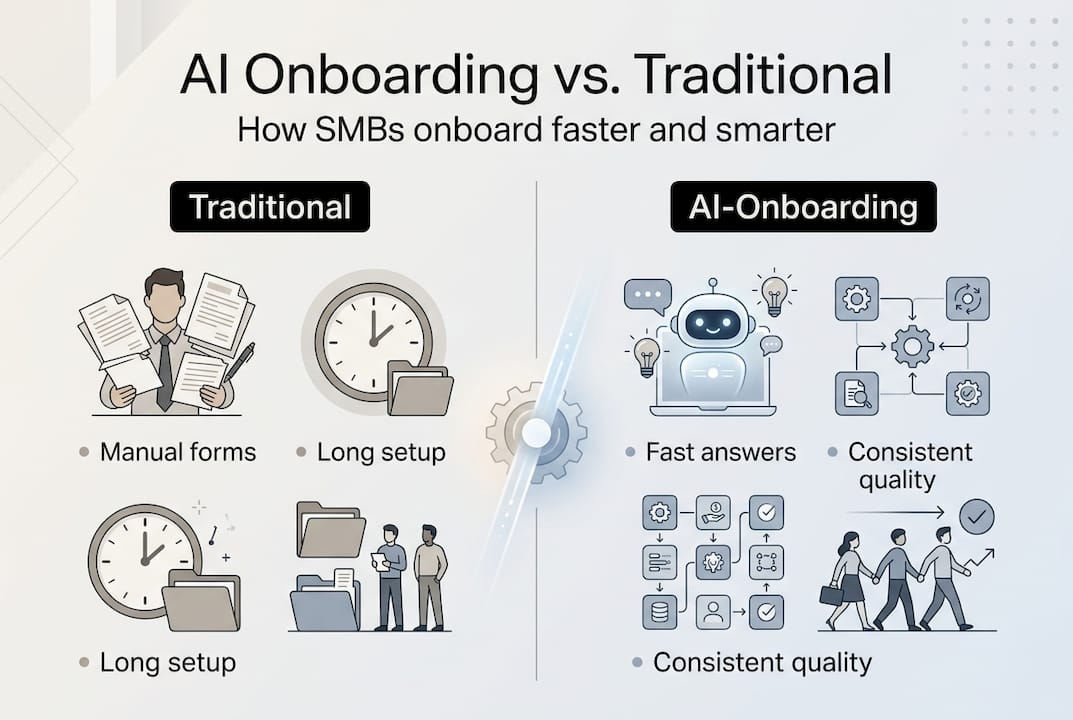
Numbers tell the real story here. Businesses that switch to AI onboarding report 40 to 50% faster time-to-productivity, retention boosts of 20 to 82%, and cost savings of up to 35% per client. That's not a marginal improvement. That's a structural shift in how your business operates.
| Metric | Traditional onboarding | AI onboarding |
|---|---|---|
| Setup time | Days to weeks | 10 to 30 minutes |
| Time-to-productivity | Weeks to months | 40 to 50% faster |
| Retention improvement | Baseline | 20 to 82% higher |
| Inquiry handling | Manual, staff-dependent | Up to 80% automated |
| Cost per client onboarded | High, scales with volume | Up to 35% lower |
| Consistency | Variable | Standardised every time |
| Availability | Business hours only | 24 hours, 7 days a week |
The consistency factor is often underestimated. Traditional onboarding quality varies depending on who's doing it, how busy they are, and how recently they reviewed the materials. AI onboarding delivers the same quality experience whether it's the first client of the day or the fiftieth. For AI business efficiency, that standardisation alone is worth the investment.
Key takeaway: AI onboarding doesn't just save time. It raises the floor on quality across every single interaction.
Common challenges and how AI onboarding addresses them
Even with compelling results, SMB owners raise legitimate concerns before adopting new technology. Here's what those challenges actually look like, and how modern AI onboarding platforms are built to handle them.
Non-technical users: Many business owners worry their team won't be able to manage an AI system. Modern platforms use intuitive interfaces that require no technical background. If your team can use a smartphone, they can manage an AI onboarding tool.
Data privacy and compliance: This is a real concern, not a hypothetical one. Quality platforms include audit trails and compliance tools, along with human-in-the-loop (HITL) escalation for sensitive scenarios. Your data stays governed and traceable.
Impersonal experiences: Automation done poorly feels cold. Done well, it feels effortless. The best platforms mix automation with human touchpoints, so clients and employees still feel seen and supported.
Other common concerns and how they're addressed:
- Remote and hybrid teams: Mobile-first design ensures consistent onboarding regardless of location
- Document-heavy processes: OCR (optical character recognition) and NLP (natural language processing) tools handle complex paperwork automatically
- Scaling too fast: AI onboarding scales with your volume without requiring additional staff
Pro Tip: Before selecting a platform, ask specifically about their HITL escalation logic. The best systems don't just automate. They know exactly when to hand off to a human, and they do it smoothly. This is how you protect your client relationships while still gaining the efficiency benefits. Explore how team productivity with AI extends beyond onboarding into your broader operations.
For a closer look at what AI self-onboarding looks like in practice, there are platforms purpose-built to make this transition straightforward.
Best practices: How to successfully implement AI onboarding in your SMB
Ready to move from understanding to action? Here's a clear roadmap based on what actually works for SMBs, not enterprise playbooks retrofitted for smaller teams.
Prioritise no-code platforms and self-guided setups for the fastest path to results. Measure time-to-value, completion rates, and user feedback from the start. Integrate with the tools you already use, such as your CRM or HRIS system, so AI onboarding fits into your existing workflow rather than creating a new silo.
- Pilot one workflow first. Don't try to automate everything at once. Pick your highest-volume, most repetitive onboarding process and start there.
- Define your success metrics upfront. Know what you're measuring before you launch, whether that's time-to-productivity, completion rates, or support ticket volume.
- Integrate with existing tools. Connect your AI onboarding platform to your CRM, calendar, or project management system for seamless data flow.
- Gather feedback early. Ask new hires or clients about their experience in the first week. Use that input to refine your workflows before scaling.
- Scale when trust is established. Once your pilot shows measurable results, expand to additional workflows or departments with confidence.
| Implementation phase | Key action | Success indicator |
|---|---|---|
| Week 1 | Upload knowledge base, connect one channel | System live and responding |
| Weeks 2 to 3 | Monitor inquiries, refine escalation rules | Reduced manual responses |
| Month 1 | Measure completion rates and feedback | Baseline metrics established |
| Month 2 and beyond | Expand to additional workflows | Consistent time and cost savings |
For a detailed AI onboarding playbook with step-by-step guidance, there are resources built specifically for SMB implementation. You can also explore how operational efficiency with AI and AI-driven operational efficiency compound your results over time.
Streamline your business onboarding with AI solutions
If this guide has shown you anything, it's that AI onboarding is no longer a luxury for large enterprises. It's a practical, accessible tool that SMBs are using right now to save time, reduce costs, and grow without burning out their teams.

The HumanOS platform is built exactly for this. Our AI agent suite handles email management, scheduling, document processing, customer support, and more through a self-guided onboarding system that requires no coding and no credit card to start. On average, our clients see an 80% boost in productivity and a 30 to 50% improvement in profitability. And if your digital presence needs the same level of attention as your operations, our managed web services deliver professionally built, continuously optimised WordPress websites across three tiers designed for where your business is right now. Start your 3-day free trial and stop duct-taping your operations together.
Frequently asked questions
What types of SMBs benefit most from AI onboarding?
Any SMB onboarding new staff or clients remotely, or those without a dedicated tech team, will see the biggest gains. Self-guided AI onboarding enables efficient operations without requiring technical expertise on staff.
Do you need technical expertise to set up AI onboarding?
No. No-code platforms are designed so SMB owners can configure and launch onboarding systems in under 30 minutes, with no developer required.
How does AI onboarding affect employee or client retention?
Significantly. Studies show AI onboarding can deliver a 20 to 82% retention boost by creating faster, more consistent, and more engaging integration experiences.
What if a process requires human judgement or compliance checks?
Quality AI onboarding platforms include human-in-the-loop escalation and built-in compliance tools, so sensitive or complex scenarios are always handled by the right person at the right time.