

Most small and mid-sized business owners assume AI operations (AIOps) is something reserved for tech giants with massive IT departments and seven-figure budgets. That assumption is costing them. AIOps uses AI, ML, and big data to automate IT issue detection, resolution, and efficiency improvement, and the technology has become far more accessible than most operators realise. Whether you're managing a growing ecommerce store, a multi-location service business, or a lean professional services firm, AIOps can dramatically reduce downtime, cut operational costs, and free your team to focus on work that actually moves the needle.
Table of Contents
- AI operations explained: What is AIOps?
- How AIOps works: The three-phase cycle
- SMB benefits: Real-world AIOps results
- Watch-outs: Pitfalls, myths, and expert advice
- How to start: Steps for SMBs adopting AIOps
- Automate your operations: Discover next-generation AIOps platforms
- Frequently asked questions
Key Takeaways
| Point | Details |
|---|---|
| AIOps explained | AI operations help you automate IT management and resolve problems faster, using artificial intelligence and data analytics. |
| SMB advantages | Small businesses can see measurable ROI in months with lower downtime, fewer alerts, and increased team focus. |
| Start with best practices | Success depends on quality data, gradual rollout, and keeping human oversight in place before scaling automation. |
| Avoid common traps | Don’t rush—prioritize clear objectives, strong governance, and realistic expectations for automation. |
AI operations explained: What is AIOps?
AIOps stands for Artificial Intelligence for IT Operations. It's the practice of applying AI and machine learning to the data your systems already generate, so that problems get caught, correlated, and resolved faster than any human team could manage alone.
Traditional IT operations rely on manual monitoring, reactive troubleshooting, and siloed tools. AIOps replaces that reactive cycle with a proactive, data-driven engine. Think of it as the difference between waiting for your car to break down versus getting an alert three weeks before a part fails.
The core mechanics of AIOps include:
- Data ingestion: Pulling in logs, metrics, traces, and events from across your systems
- Anomaly detection: Spotting unusual patterns before they become outages
- Event correlation: Connecting related alerts so you see the root issue, not 50 symptoms
- Root cause analysis (RCA): Identifying what actually caused the problem
- Predictive analytics: Forecasting issues before they impact customers
- Automated remediation: Triggering fixes without waiting for a human to act
Here's a quick comparison of traditional IT operations versus AIOps:
| Capability | Traditional IT ops | AIOps |
|---|---|---|
| Issue detection | Manual, reactive | Automated, proactive |
| Alert volume | High, noisy | Filtered, prioritised |
| Resolution speed | Hours to days | Minutes to hours |
| Data sources | Siloed | Unified and correlated |
| Cost over time | Increases with scale | Decreases with scale |
"AIOps is not about replacing your IT team. It's about giving them superpowers so they stop firefighting and start innovating."
For SMBs, the real value of AI automation for efficiency is that you don't need a dedicated IT department to benefit. Platforms today are built for operators who want results without needing to understand every algorithm underneath. Understanding operational efficiency with AI starts with recognising that AIOps is a tool for your whole business, not just your tech stack.
How AIOps works: The three-phase cycle
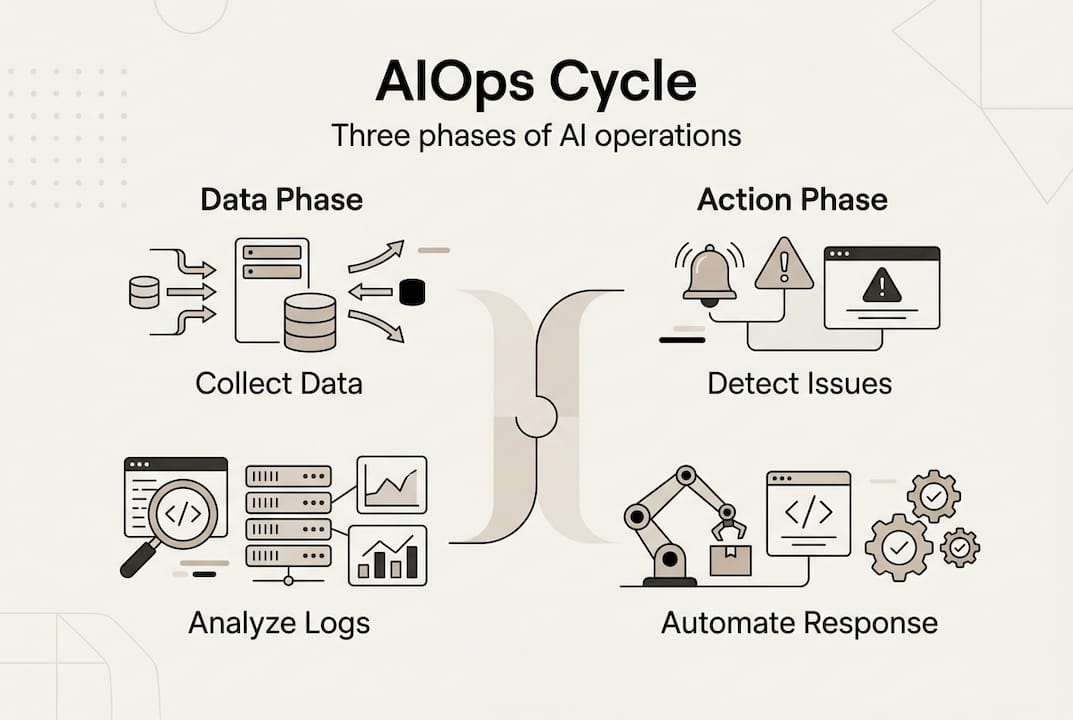
Understanding the basic structure is one thing, but how does AIOps actually work in practice? The typical AIOps workflow follows three core phases: collect and analyse data, detect and correlate and predict issues, then automate responses.
Here's how each phase plays out for an SMB:
- Collect and analyse: Your AIOps platform ingests data from your website, apps, customer support tools, and infrastructure. It normalises this data so everything speaks the same language.
- Detect, correlate, and predict: The AI identifies anomalies, groups related events, and flags what's likely to cause a problem before it does. Instead of 40 alerts, you get one clear signal.
- Automate and remediate: The system triggers a pre-approved fix, restarts a service, scales a resource, or alerts the right person with full context already assembled.
For a retail SMB, this might look like: your checkout page slows down at peak hours, AIOps detects the pattern, predicts the next spike, and automatically scales your server capacity before a single customer notices.

| Phase | What happens | SMB example |
|---|---|---|
| Collect and analyse | Data ingestion and normalisation | Logs from your website and CRM unified |
| Detect and predict | Anomaly detection and correlation | Slow checkout flagged before peak hour |
| Automate and remediate | Triggered fix or alert | Server scales up automatically |
Pro Tip: When setting up AIOps, always define a "stop rule" for every automated action. This means specifying the exact condition under which the automation halts, preventing runaway loops that can make problems worse.
Keeping a human in the loop at critical decision points is essential, especially early on. Improving team productivity with AIOps works best when your team understands what the system is doing and why. A solid operations automation guide will always emphasise governance alongside automation.
SMB benefits: Real-world AIOps results
Now that you know the technical backbone, let's see what kind of tangible results AIOps is delivering in real-world scenarios.
The numbers are compelling. Empirical benchmarks show 30 to 40% reductions in mean time to resolution (MTTR), 60 to 90% fewer false alerts, and up to 45% fewer customer-impacting incidents. HCL reduced MTTR by 33% and cut support tickets by 62%. ServiceNow saved $1.5 million and reduced alerts by 96%.
Those are enterprise figures, but the underlying mechanics scale down beautifully. Here's what SMBs typically experience:
- Fewer false alarms: Your team stops chasing noise and focuses on real problems
- Faster resolution: Issues that used to take hours get resolved in minutes
- Reduced downtime costs: Every minute of uptime you recover has direct revenue impact
- Smaller IT overhead: You don't need to hire more staff to manage more complexity
- Predictable performance: Customers experience consistent service, which builds trust
Key stat: Businesses that implement AIOps correctly typically see measurable ROI within three to six months, even at modest data volumes.
For practical guidance on getting more from your tools, explore these AI productivity tips and a curated list of top AI productivity tools that SMBs are using right now. You can also benchmark your current state against an operational efficiency checklist to identify your biggest gaps before you invest.
Watch-outs: Pitfalls, myths, and expert advice
Despite these powerful results, not all news about AIOps is perfect. Let's get real about what works, what doesn't, and how to set yourself up for success.
The biggest myth in AIOps is full autonomy. The idea that you can deploy an AI system and walk away while it handles everything is mostly hype. Correlation does not equal causation, and many AIOps failures trace back to tool-first adoption, poor data quality, and overconfidence in automated root cause analysis. Even Gartner has shifted its language toward "Event Intelligence" to reflect more realistic expectations.
Common pitfalls to avoid:
- Tool-first adoption: Buying a platform before defining your pain points and data strategy
- Poor data quality: Garbage in, garbage out. Inconsistent or unlabelled data produces unreliable signals
- Overreliance on correlation: AIOps can surface patterns, but human judgement is still needed to confirm causation
- Ignoring model drift: AI models degrade over time as your environment changes. Regular retuning is non-negotiable
- No stop rules: Automated remediations without clear halt conditions can trigger cascading failures
"The real risk isn't that AIOps won't work. It's that you'll trust it too much, too fast, before you've validated its outputs in your specific environment."
Edge cases and nuances like false positives from poor models, high cardinality data killing performance, and LLM hallucinations in RCA are real concerns that require governance frameworks, not just good intentions.
Pro Tip: Use SLO-based alerting (Service Level Objectives) as your north star. Instead of alerting on every anomaly, alert only when you're at risk of breaching a customer-facing commitment. This dramatically reduces noise and keeps your team focused.
For SMBs using AI for customer support, the same principles apply. Govern your automations, review outputs regularly, and follow proven automation best practices to avoid the traps that derail early adopters.
How to start: Steps for SMBs adopting AIOps
Ready to improve your operations without falling into common traps? Here's how you can get started and thrive with AIOps in your business.
A phased, human-in-loop approach that prioritises data quality and gradual rollout is the most reliable path to ROI for SMBs. Follow these steps:
- Define your pain points and SLOs: What's breaking most often? What does good performance look like for your customers? Write it down before touching any tool.
- Audit your data sources: Identify where your logs, metrics, and events live. Clean up inconsistencies and establish labelling standards.
- Choose a focused pilot: Pick one system or workflow to start. Your website monitoring, customer support queue, or order fulfilment pipeline are good candidates.
- Measure MTTR and alert rates: Establish a baseline before you start, then track improvement weekly. Numbers keep you honest.
- Keep humans in the loop: For the first 90 days, have a team member review every automated action. Build confidence in the system before expanding its authority.
- Review and retune regularly: Schedule monthly model reviews. Your business changes, and your AIOps configuration needs to keep up.
Pro Tip: Don't try to automate everything at once. Start with noise reduction, which means filtering false alerts, and build from there. Quick wins in the first 30 days create the organisational buy-in you need to scale.
The fastest way to boost operational efficiency is to start small, prove value, and expand deliberately. A well-structured automation guide will always reinforce this phased approach over a big-bang deployment.
Automate your operations: Discover next-generation AIOps platforms
Once you're confident in your AIOps basics, the fastest path to adoption is leveraging ready-made, expert-built AI operations solutions. You don't need to build this from scratch.

HumanOS is built exactly for this moment. The platform combines a suite of AI agents that automate email management, scheduling, document processing, customer support, data analysis, and more, with a fully managed web services division that keeps your digital infrastructure running and optimised. No coding required. No credit card to start. The AI Operating System runs on a proprietary MCP-powered agent architecture that keeps AI explainable and embedded inside your existing workflows, not bolted on as another tab you forget to open. If you're ready to see what a professionally managed, AI-driven operation looks like for your business, explore the web services options and start your three-day free trial today. Guaranteed results, backed by 10+ years of systems architecture experience and a BBB A-rating.
Frequently asked questions
What is the main purpose of AI operations (AIOps)?
AIOps automates IT issue detection and management using AI and data analytics to save time and improve system reliability. The goal is to shift your operations from reactive firefighting to proactive, predictable performance.
How quickly can SMBs see results from AIOps?
Most SMBs see measurable ROI, including reduced alerts and faster resolution, within three to six months after scaling AIOps. Starting with a focused pilot accelerates that timeline significantly.
What mistakes should SMBs avoid with AIOps?
Avoid tool-first adoption and poor data quality, and never remove human oversight entirely. These three mistakes account for the majority of AIOps implementations that fail to deliver promised results.
Is AIOps only for IT teams?
No. AIOps benefits anyone managing digital services, from business owners to customer support leads, by improving uptime and reducing manual tasks. AI and big data tools are increasingly accessible to non-technical operators through modern platforms built for SMBs.