

Many small and mid-sized business owners mistake operations platforms for complex ERP systems, missing out on flexible automation that could transform their workflow. Operations platforms are lightweight, no-code tools designed specifically for SMBs seeking to automate routine tasks without enterprise-level complexity or cost. Understanding this distinction matters because choosing the wrong system can lock you into expensive consulting contracts and rigid software that fights your business instead of supporting it. This guide clarifies what operations platforms are, how they differ from ERPs, and how they deliver measurable productivity and profitability gains for businesses ready to automate intelligently.
Table of Contents
- Key Takeaways
- What is an operations platform and how does it work?
- How operations platforms differ from ERP systems
- Benefits and proven results for small and mid-sized businesses
- Common pitfalls and nuanced considerations when adopting operations platforms
- Discover HumanOS: AI operating system for SMBs
- Frequently asked questions
Key Takeaways
| Point | Details |
|---|---|
| No code automation | No code operations platforms automate routine tasks without enterprise level complexity, enabling SMBs to automate quickly. |
| Platform differs from ERP | They are lightweight and flexible, whereas ERPs are rigid and better suited for large enterprises. |
| Productivity and revenue gains | Real world use shows throughput increases, hours saved, and revenue per employee rising after implementation. |
| Fix flawed processes first | Automation works best after identifying and correcting flawed processes before applying automation. |
| Fast ROI demonstrated | Case studies indicate 4 to 6 months to achieve a positive return on investment. |
What is an operations platform and how does it work?
An operations platform is a digital system that automates and orchestrates business processes without requiring coding expertise or technical staff. Think of it as the connective tissue between your existing tools, pulling data from multiple sources and triggering actions based on rules you define visually. Unlike enterprise resource planning systems, operations platforms are lighter, flexible, and designed for businesses that need results in days rather than months.
The core functions of operations platforms centre on workflow automation, data unification, SaaS consolidation, and employee task management. These systems replace the manual copying, pasting, and checking that drain hours from your team's day. When a customer submits a form, the platform can automatically create a project, assign tasks, send notifications, and update your CRM without anyone touching a keyboard.
Typical components include visual workflow builders that let you map processes by dragging boxes and arrows, integration connectors that link your email, calendar, payment processor, and other tools, dashboards that surface key metrics in real time, and alerting systems that notify team members when action is needed. The best platforms feel invisible because they work inside your existing tools rather than demanding you learn another interface.
Pro Tip: Prioritise platforms with no-code or low-code design to reduce implementation time and eliminate dependency on technical staff or expensive consultants.
Operations platforms excel at repetitive, rules-based work. They handle email triage, appointment scheduling, document processing, data entry, report generation, and approval workflows. For business process automation, this means your team focuses on strategy and customer relationships whilst the platform handles operational grunt work. The system learns your patterns and applies them consistently, reducing errors that occur when humans rush through tedious tasks.
How operations platforms differ from ERP systems
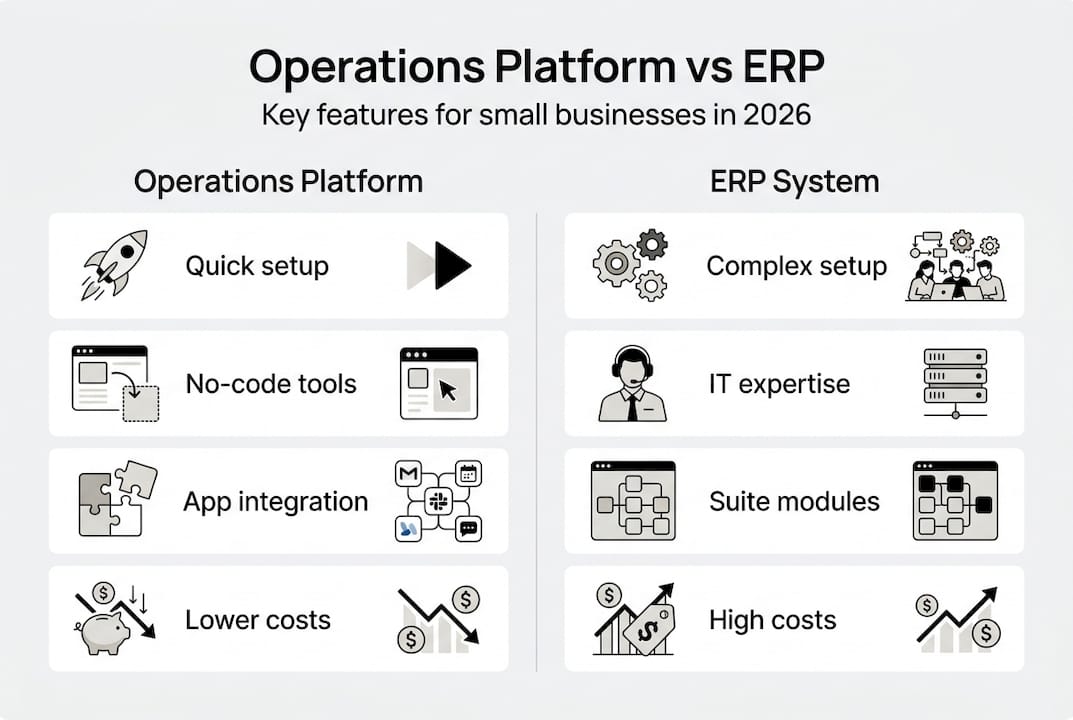
ERP systems are integrated software suites designed for large enterprises with complex manufacturing, supply chain, and financial operations. They consolidate everything from inventory management to human resources into one massive database, requiring months of implementation, expensive consultants, and significant customisation. ERPs are rigid and consultant-heavy, making them better suited for organisations with standardised processes and dedicated IT teams.
Operations platforms take the opposite approach. They deploy in days or weeks, integrate with tools you already use, and adapt as your business evolves. Whilst ERPs force you to change your processes to match the software, operations platforms mould themselves to your existing workflow. This flexibility matters enormously for SMBs that pivot quickly, test new offerings, or operate in dynamic markets where rigid systems become anchors.

Implementation time reveals the fundamental difference. ERPs typically require 6-18 months for full deployment, involving process mapping, data migration, extensive training, and painful adjustment periods where productivity drops before it recovers. Operations platforms can automate your first workflow in hours and scale gradually as you identify new automation opportunities. You're not betting the business on a massive transformation project.
ERP systems for SMBs:
- Comprehensive but inflexible modules for finance, inventory, and HR
- High upfront costs ranging from $50,000 to $500,000 for small implementations
- Require dedicated IT staff or ongoing consultant relationships
- Best for manufacturing, distribution, or businesses with complex compliance needs
Operations platforms for SMBs:
- Modular tools that integrate existing software without replacement
- Subscription pricing starting at $50-500 monthly with minimal setup fees
- Designed for business users without technical backgrounds
- Ideal for service businesses, agencies, and companies prioritising speed
| Factor | ERP Systems | Operations Platforms |
|---|---|---|
| Implementation time | 6-18 months | Days to weeks |
| Flexibility | Rigid, process-driven | Adaptable, workflow-driven |
| Typical cost | $50K-$500K+ setup | $600-$6K annually |
| Scalability | Scales with modules | Scales with integrations |
| Best fit | Manufacturing, large teams | Service businesses, SMBs |
The cost structure also differs fundamentally. ERPs charge massive upfront licensing fees plus annual maintenance that runs 15-20% of the initial cost. Operations platforms use subscription pricing that scales with usage, letting you start small and expand as automation delivers returns. This aligns investment with results rather than requiring huge capital outlays before you see benefits.
For business operations automation, operations platforms deliver faster ROI because they target high-impact, low-complexity workflows first. You automate invoice processing this month, customer onboarding next month, and reporting the month after. Each automation pays for itself quickly, building momentum and buy-in across your team.
Benefits and proven results for small and mid-sized businesses
Empirical data from SMB implementations shows operations platforms deliver 30-50% throughput increases, saving 15-25 hours per employee monthly whilst boosting revenue per employee by 40%. These aren't theoretical projections. They're measured outcomes from businesses that automated repetitive workflows and redirected human effort toward revenue-generating activities.
A boutique agency case study documented 30% cost reduction by replacing multiple SaaS subscriptions with an integrated operations platform that handled project management, time tracking, invoicing, and client communication. The agency recovered 20 hours weekly from administrative tasks, allowing senior staff to focus on strategy and client relationships rather than data entry and status updates.
Quantified benefits from operations platform adoption:
- Throughput increases of 30-50% through automated workflow orchestration
- 15-25 hours saved per employee monthly by eliminating manual data tasks
- Revenue per employee improvements of 40% when automation frees capacity for billable work
- SaaS cost reductions of 20-35% by consolidating redundant tools
Metric Before Automation After Automation Improvement Monthly throughput 100 projects 145 projects 45% increase Hours per employee 160 hours 138 productive hours 22 hours saved Revenue per employee $8,500 $11,900 40% increase SaaS tool count 12 subscriptions 5 subscriptions 58% reduction Error rate 8% manual errors 1% system errors 87% improvement
"We implemented an operations platform expecting modest efficiency gains. Within four months, we'd automated 60% of our administrative workflows, cut tool costs by $2,400 monthly, and increased project capacity by 35% without hiring additional staff. The ROI was undeniable."
These benefits translate directly into competitive advantage. Businesses that automate faster can undercut competitors on price whilst maintaining margins, deliver projects quicker, respond to customer requests within hours instead of days, and scale revenue without proportionally scaling headcount. The operational efficiency boost compounds over time as you identify and automate additional workflows.
The profitability impact extends beyond direct cost savings. When employees spend less time on tedious tasks, engagement and retention improve. When customers receive faster, more consistent service, satisfaction scores rise and referrals increase. When owners reclaim time from operational firefighting, they can focus on strategic initiatives that drive long-term growth.
Operations platforms also reduce the productivity loss from context switching. Instead of toggling between twelve different tools to complete one workflow, employees work within familiar interfaces whilst the platform handles background orchestration. This seemingly small change eliminates the cognitive load that drains energy and creates errors.
Common pitfalls and nuanced considerations when adopting operations platforms
The biggest mistake SMBs make is automating broken processes without fixing them first. If your current workflow is inefficient, confusing, or error-prone, automation will simply execute those problems faster and at greater scale. Before building any automation, map your ideal process, eliminate unnecessary steps, and clarify decision points. Only then should you automate.
Vendor lock-in poses a real risk when platforms use proprietary formats or make data export difficult. Watch for vendor lock-in by choosing platforms with open integration standards, API access, and straightforward data portability. You should be able to switch platforms without losing years of workflow logic or starting from scratch.
Key pitfalls to avoid:
- Automating flawed processes that amplify existing inefficiencies
- Vendor lock-in from proprietary platforms with limited export options
- Over-automation that removes human judgement from decisions requiring nuance
- Unrealistic expectations about AI agent autonomy and reliability
- Ignoring specialised needs that generic platforms cannot address
Over-automation creates brittle systems that break when conditions change. Not every task should be automated. Customer complaints, strategic decisions, and relationship-building require human judgement. The goal is automating repetitive, rules-based work whilst preserving human involvement where it adds genuine value.
AI agent limitations matter more than marketing materials suggest. Current AI agents excel at structured tasks with clear inputs and outputs but struggle with ambiguous instructions, edge cases, and tasks requiring deep context. Treat AI agents as capable assistants rather than autonomous workers. They need guardrails, monitoring, and occasional human intervention.
Very small teams with fewer than five people may find operations platforms overkill. If you're a solopreneur or tiny team, simple task management and a few targeted integrations might deliver better results than a comprehensive platform. Evaluate whether the learning curve and subscription cost justify the automation benefits at your current scale.
Pro Tip: Choose platforms with open integration standards and be mindful of hidden costs in configuration, training, and ongoing maintenance that vendors don't highlight upfront.
Set clear success metrics before implementation. Decide what you're optimising for: time savings, cost reduction, error elimination, or capacity increase. Measure baseline performance, track progress monthly, and adjust your automation strategy based on results. Without metrics, you can't distinguish genuine improvements from busy work that feels productive but delivers no measurable value.
Integration failures cause more abandoned automation projects than technical limitations. If your operations platform can't reliably connect with your CRM, accounting software, or communication tools, automation becomes a source of frustration rather than efficiency. Test critical integrations during evaluation and confirm they handle your data volume and complexity.
Finally, improve team productivity by involving employees in automation design. The people doing the work know where bottlenecks exist and which tasks drain their energy. When they help design automation, they become advocates rather than resistors. This participation also surfaces edge cases and exceptions that might break poorly designed automation.
Discover HumanOS: AI operating system for SMBs
If you're ready to move from understanding operations platforms to implementing one, HumanOS offers an AI-powered, no-code solution designed specifically for small and mid-sized businesses. The platform combines workflow automation with AI agents that handle email management, scheduling, document processing, customer support, and data analysis without requiring technical expertise or expensive consultants.

HumanOS delivers measurable results: 80% productivity boosts and 30-50% profitability improvements backed by guaranteed outcomes. The platform deploys through self-guided onboarding that requires no coding and no credit card to start, letting you test automation on real workflows before committing. Unlike rigid ERP systems, HumanOS adapts to your existing processes whilst consolidating redundant SaaS tools that drain your budget.
The AI operating system with AI agents runs on a proprietary MCP-powered architecture that keeps AI explainable and governed, embedding automation inside your existing workflows rather than forcing you to learn another interface. For businesses seeking comprehensive digital infrastructure, HumanOS also offers web services automation that builds, hosts, and continuously optimises professional websites without the agency markup or DIY guesswork.
Frequently asked questions
What are examples of operations platforms suitable for SMBs?
Operations platforms suitable for SMBs include no-code tools like HumanOS, Zapier, Airtable, and Monday.com Automation. These platforms emphasise ease of use, fast deployment, and strong workflow integration without requiring technical staff. They connect your existing tools and automate repetitive tasks through visual interfaces that business users can configure themselves.
How long does it typically take to implement an operations platform?
Operations platforms can often be implemented in days or weeks, much faster than ERP systems which may take months or years. The timeline depends on process complexity and team readiness. Simple workflow automation might go live within hours, whilst comprehensive implementations spanning multiple departments typically complete within 4-8 weeks.
Can operations platforms replace ERP systems entirely for SMBs?
Operations platforms are often sufficient for SMBs seeking flexibility and automation without ERP complexity. However, for highly specialised finance or manufacturing needs requiring deep integration across inventory, production, and accounting, ERPs may still be necessary. Many SMBs find hybrid approaches effective, using operations platforms for workflow automation whilst maintaining lightweight accounting or inventory software.
What are the biggest risks when automating business operations?
Key risks include automating broken processes, vendor lock-in, integration failures, and overreliance on unreliable AI agents. Mitigate these by fixing processes before automating, choosing platforms with open integration standards, testing critical workflows thoroughly, and maintaining human oversight for decisions requiring judgement. Start with low-risk workflows to build confidence before automating mission-critical processes.