

Manual scheduling drains hours every week for small business owners juggling client appointments, staff shifts, and resource allocation. Automated scheduling reduces operational costs by up to 40% while eliminating double bookings and missed appointments that hurt your bottom line. AI-powered scheduling systems analyse calendars in real time, apply your business rules automatically, and predict no-shows before they happen. This guide walks you through preparing your business for automation, executing the implementation, troubleshooting common issues, and measuring the productivity gains that transform your operations.
Table of Contents
- Key Takeaways
- Preparing for an automated scheduling process
- Executing the automated scheduling process
- Troubleshooting and optimising your automated scheduling
- Verifying results and measuring success
- Streamline scheduling with HumanOS AI operating system
- Frequently asked questions
Key Takeaways
| Point | Details |
|---|---|
| Cost savings through automation | Automated scheduling can reduce operating costs by up to 40 percent and eliminates double bookings and missed appointments. |
| AI optimizes resources | AI powered scheduling analyses calendars in real time, applies your business rules automatically, and predicts no shows to improve throughput. |
| Hybrid oversight model | A hybrid approach combines AI efficiency with human judgement to handle edge cases while keeping your unique needs front and centre. |
| No code pilots | Starting with no code pilots lets you measure impact before deeper technical integration and demonstrates ROI. |
Preparing for an automated scheduling process
Successful automation starts with understanding your current workflows and data landscape. Map every scheduling touchpoint in your business: client bookings, staff availability, equipment reservations, and service delivery windows. Document where this information lives today, whether in Google Calendar, Outlook, Calendly, or spreadsheets scattered across departments.
Define your business rules with precision. What skills must staff possess for specific appointments? How much buffer time do you need between bookings? Which regional holidays affect your operations? Do certain clients require specific providers? Write these rules down explicitly because your AI system will enforce them exactly as configured. Vague rules produce inconsistent results.
Start with a no-code pilot using tools that integrate with your existing calendar ecosystem. Zapier connected to AI services can handle basic automation patterns without requiring developer resources. This approach lets you test workflows, identify gaps, and measure time savings before investing in custom development. True automation requires APIs and complex rules beyond basic UI tools, but pilots prove value first.
Pro Tip: Document every exception and edge case you encounter during manual scheduling for two weeks. This list becomes your testing checklist when validating automated workflows.
Your technical requirements depend on automation depth. Basic integrations need calendar API access and webhook support for real-time updates. Advanced systems require CRM connectivity, payment processing hooks, and custom business logic engines. Assess your current tech stack capabilities before committing to specific platforms.
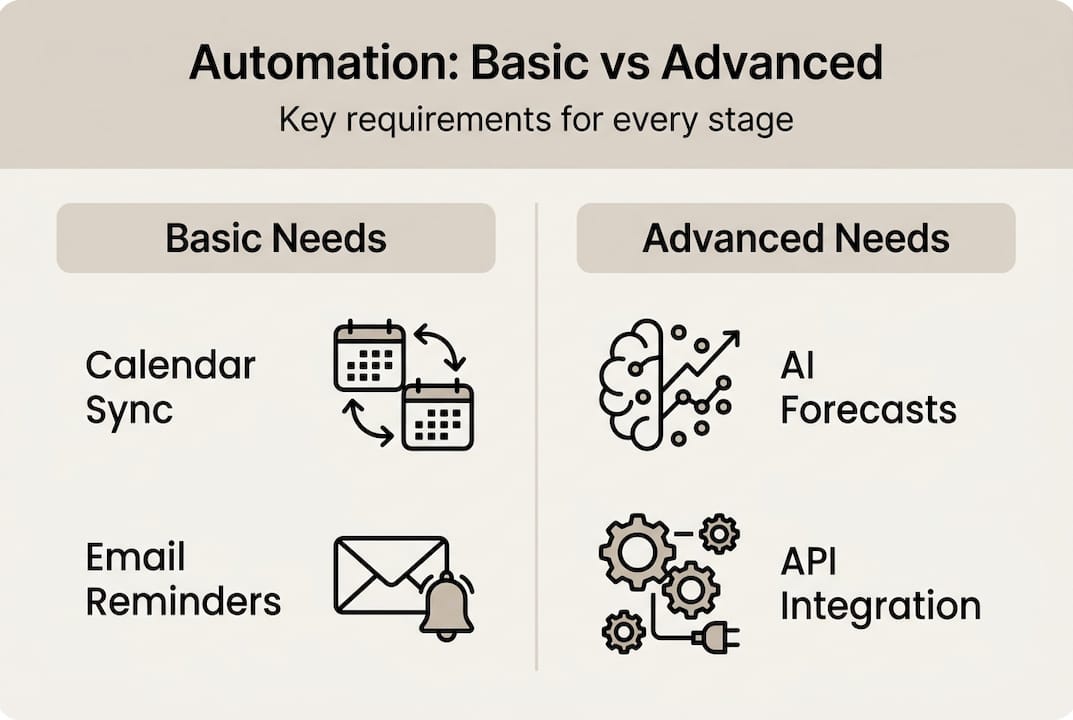
| Requirement | Basic automation | Advanced automation |
|---|---|---|
| Calendar API | Google/Outlook read/write | Multi-calendar sync with conflict resolution |
| Business rules | Simple availability blocks | Complex skill matching, resource optimisation |
| Integration depth | Zapier/Make.com workflows | Custom API development with CRM/ERP systems |
| Data requirements | Current calendar data | Historical booking patterns, no-show trends |
Outline edge cases your business faces regularly. Time zone complexities for remote teams, last-minute cancellations, equipment maintenance windows, and staff training days all require special handling. Your business operations automation guide should address these scenarios upfront rather than discovering them after go-live. Understanding effective time tracking strategies helps you measure the time saved through automation accurately.
Collect baseline metrics before implementation. How many hours per week does your team spend on scheduling? What's your current no-show rate? How often do double bookings occur? These numbers prove ROI and guide optimisation priorities. Without baseline data, you're guessing at improvement rather than measuring it.
Executing the automated scheduling process
Configuration starts with connecting your AI engine to all calendar sources and defining enforcement rules. The system must read availability across platforms, apply your documented business rules, and write confirmed bookings back to appropriate calendars. AI scheduling involves real-time calendar analysis, application of business rules, and ML prediction of no-shows simultaneously.
Choose your scheduling methodology based on business complexity. Rule-based systems work for straightforward appointment booking with fixed durations and clear staff qualifications. Machine learning forecasting suits businesses with variable demand patterns and historical data to train models. Dynamic optimisation handles complex resource allocation where multiple constraints interact, like multi-location service businesses with travelling staff.
- Configure calendar integrations with two-way sync enabled for real-time updates
- Input business rules including staff skills, service durations, buffer requirements, and blackout periods
- Set up automated notifications for confirmations, reminders, and cancellation workflows
- Connect CRM systems to pull customer preferences and booking history
- Enable ML prediction models if you have six months of historical booking data
- Test workflows with real scenarios covering standard bookings and known edge cases
Pro Tip: Run your automated system in shadow mode for one week, comparing its booking decisions against your manual choices. This reveals rule gaps before customers experience issues.
Methodologies include ML for demand forecasting and agentic workflows for booking optimisation. Agentic systems make autonomous decisions within defined parameters, adapting to changing conditions without human input for routine scenarios. This approach suits businesses with predictable patterns but occasional complexity requiring intelligent handling.

| Methodology | Best for | Implementation complexity | Typical ROI timeline |
|---|---|---|---|
| Rule-based | Fixed schedules, clear constraints | Low | 1-2 months |
| ML forecasting | Variable demand, seasonal patterns | Medium | 3-4 months |
| Dynamic optimisation | Multi-resource, complex constraints | High | 4-6 months |
| Agentic workflows | Autonomous decision-making needs | Medium-High | 2-3 months |
Automated notifications maintain customer engagement without manual effort. Configure confirmation emails immediately after booking, reminder messages 24 hours before appointments, and follow-up requests for feedback. Integrate these with your existing communication channels rather than introducing new platforms customers must learn.
CRM integration enriches scheduling decisions with customer context. Past appointment history, service preferences, payment reliability, and communication preferences all inform better booking choices. A customer who consistently arrives early can fill tight morning slots. Someone with a history of no-shows might require confirmation calls.
Test workflows systematically before full deployment. Book appointments across all service types, staff members, and time slots. Attempt double bookings, schedule during blackout periods, and request services outside business hours. Every test failure reveals a configuration gap to fix now rather than discovering it through customer complaints. Understanding the role of AI in scheduling helps you anticipate where testing should focus. Learn how to improve team productivity with AI automation by observing how automated scheduling changes team workflows.
Troubleshooting and optimising your automated scheduling
Double bookings persist despite calendar blocks when sync delays create race conditions between systems. Two bookings submitted simultaneously might both see availability before either writes back to the calendar. Implement optimistic locking where the system reserves slots during the booking process, releasing them only if the transaction fails. This prevents the gap between reading availability and confirming the appointment.
Edge cases include time zones, DST, double-booking, and sync issues requiring careful handling. Regional holidays vary by location for multi-site businesses. Staff taking rolling time off creates availability gaps that shift daily. Daylight saving time transitions cause appointment time ambiguities twice yearly. Document every edge case encountered and create specific handling rules.
- Monitor sync latency between calendar systems and set appropriate buffer windows
- Implement conflict resolution rules for simultaneous booking attempts
- Create holiday calendars for each region your business operates in
- Build time zone conversion validation into booking confirmation workflows
- Set up alerts for unusual patterns like sudden availability drops or booking surges
Hybrid human-AI oversight handles exceptions automation can't resolve independently. Complex customer requests, urgent rescheduling needs, and situations requiring judgement calls escalate to human staff. AI scheduling needs oversight to avoid bias and compliance risks while handling bulk operations. Configure clear escalation triggers so staff know which scenarios require their attention.
Pro Tip: Review all automated decisions that triggered manual overrides weekly. Patterns in overrides reveal rule gaps you can encode, gradually reducing human intervention needs.
"Automation handles the predictable 80% of scheduling decisions flawlessly, but human judgement remains essential for the complex 20% where context, relationships, and nuance matter more than efficiency."
Monitor key metrics to detect performance degradation early. Track average booking time, no-show rates, customer satisfaction scores, and staff utilisation rates. Sudden changes signal problems requiring investigation. A spike in manual overrides indicates rule gaps. Rising no-show rates suggest reminder workflows need adjustment.
Apply incremental improvements based on data patterns rather than assumptions. If morning appointments show higher no-show rates, adjust reminder timing or require confirmation calls. When certain staff members consistently run over scheduled time, increase their buffer periods. Let metrics guide optimisation priorities.
Reevaluate business rules quarterly as your operations evolve. New services, additional staff, expanded hours, and seasonal demand shifts all require rule updates. Your business process automation guide should include scheduled review cycles rather than waiting for problems to surface.
Verifying results and measuring success
Track time saved by comparing hours spent on scheduling tasks before and after automation. Survey staff weekly during the first month to quantify the difference. Most SMBs recover 10-15 hours weekly that redirect toward revenue-generating activities. This time savings alone often justifies automation investment within weeks.
SMBs see 25-40% operational cost savings and 40-50% no-show reductions with AI scheduling. These improvements compound as freed staff time enables better customer service, more appointments handled, and reduced overtime costs. No-show prediction lets you overbook strategically or fill gaps proactively.
| Metric | Before automation | After automation | Improvement |
|---|---|---|---|
| Weekly scheduling hours | 15 hours | 3 hours | 80% reduction |
| No-show rate | 18% | 8% | 56% improvement |
| Double bookings per month | 12 incidents | 1 incident | 92% reduction |
| Average booking time | 8 minutes | 90 seconds | 81% faster |
| Staff overtime hours | 25 hours/month | 12 hours/month | 52% decrease |
Calculate ROI by comparing implementation costs against quantified savings. Typical ROI reaches 3.5x with payback from 1-8 months on AI scheduling investments. Include both direct costs like software subscriptions and indirect costs like staff training time. Measure savings through reduced overtime, fewer missed appointments, and staff time redeployed to higher-value work.
- Time savings: hours recovered weekly multiplied by staff hourly cost
- No-show reduction: prevented lost revenue from better attendance rates
- Overtime reduction: decreased premium pay from better resource allocation
- Customer satisfaction: improved retention and referral rates from smoother booking
- Staff satisfaction: reduced frustration from manual scheduling tasks
Use insights to refine scheduling rules continuously. If certain service combinations frequently run over time, adjust duration estimates. When specific customer segments show different behaviour patterns, create targeted booking rules. Data-driven refinement compounds efficiency gains over time.
Scale deployments gradually after proving value in one area. Start with your highest-volume service or most scheduling-intensive department. Once metrics confirm success, expand to additional services, locations, or teams. This staged approach limits risk while building internal expertise. Understanding what is operational efficiency and how to boost it with AI provides context for measuring broader business impact. Track productivity gains with AI scheduling beyond just time savings to capture full value.
Streamline scheduling with HumanOS AI operating system
Manual scheduling steals hours you'll never recover. HumanOS provides AI agents that integrate seamlessly with your existing calendars and workflows, automating appointment booking, staff allocation, and resource optimisation without requiring coding skills or technical expertise. Our platform handles the predictable scheduling tasks while escalating complex scenarios to your team with full context.

Start with a pilot project that proves value within weeks, then scale across your entire operation as confidence builds. The AI operating system runs 24/7, reducing operational costs while freeing your team to focus on customer relationships and business growth. HumanOS delivers measurable productivity improvements with hybrid oversight that keeps you in control. Explore our AI automation web services to see how we combine scheduling automation with managed web infrastructure for complete operational transformation.
Frequently asked questions
What is AI-powered automated scheduling and how does it work?
AI-powered automated scheduling uses machine learning algorithms to analyse calendar availability, apply business rules, and book appointments without human intervention. The system reads availability across multiple calendars, matches customer requests with staff skills and availability, predicts no-show likelihood based on historical patterns, and confirms bookings automatically. It handles routine decisions instantly while escalating complex scenarios to human staff.
How long does it take to implement automated scheduling for my business?
Basic implementations using no-code tools take 1-2 weeks from initial setup to live operation. This includes connecting calendars, defining business rules, and testing workflows. More complex systems with custom integrations, ML forecasting, and multi-location coordination require 4-8 weeks. Most businesses see measurable time savings within the first month and full ROI within 3-6 months.
Can automated scheduling handle my unique business requirements?
Automated scheduling excels at routine bookings following clear rules but requires hybrid human-AI oversight for exceptions. Configure the system with your specific constraints like staff qualifications, equipment requirements, regional holidays, and customer preferences. Complex scenarios requiring judgement, urgent changes, or special accommodations escalate to your team with full context for quick resolution.
What happens when the automated system makes a mistake?
Modern scheduling systems include rollback capabilities and audit trails for every booking decision. When errors occur, you can reverse the automated booking, understand why the system made that choice, and update rules to prevent recurrence. Implement monitoring alerts for unusual patterns and maintain human oversight during initial deployment to catch issues before they affect customers.
How much does automated scheduling cost compared to manual processes?
Scheduling automation costs range from $50-$500 monthly depending on business size and feature complexity. Compare this against 10-15 hours weekly of staff time at $25-$50 per hour, totalling $1,000-$3,000 monthly in labour costs. Most SMBs achieve 3.5x ROI with payback periods under six months when including reduced no-shows, eliminated overtime, and improved customer satisfaction.