

TL;DR:
- AI automation helps small businesses save time, reduce costs, and increase revenue across key areas.
- Proper planning, clean data, and owner accountability are essential for AI success.
- Incremental, disciplined implementation of AI drives measurable productivity and profitability gains.
Running a small or mid-sized business in Canada means wearing every hat, stretching every dollar, and somehow finding time to grow. Manual processes eat hours, slow customer response costs sales, and redundant admin tasks quietly drain your margins. AI is changing that equation fast. Businesses that adopt even basic automation are seeing real, measurable gains in revenue and efficiency, without needing a technical background or a large budget. This guide walks you through the exact steps to identify your profitability gaps, choose the right tools, implement AI with confidence, and avoid the mistakes that derail most attempts.
Table of Contents
- Identifying the profitability problem for SMBs
- Preparing for AI-driven profitability: Tools and requirements
- Step-by-step guide: Implementing AI for operational efficiency
- Troubleshooting AI adoption: Common pitfalls and how to avoid them
- The uncomfortable truth about boosting profitability with AI
- Start boosting profitability with AI solutions
- Frequently asked questions
Key Takeaways
| Point | Details |
|---|---|
| AI drives major profit gains | SMBs leveraging AI typically see revenue growth of 16-27% and productivity boosts up to 42%. |
| Low-cost solutions are accessible | Affordable AI tools, starting at $20-50 per month, offer fast payback periods for business owners. |
| Planning and preparation matter most | Projects succeed when businesses define their goals, choose the right tools, and build data readiness. |
| Implementation is best step-by-step | Successful SMBs adopt AI one process at a time, monitor impact, and scale gradually for lasting gains. |
| Avoid common pitfalls | Over two-thirds of failed AI projects stem from poor strategy, bad data, and skill gaps—focus on execution. |
Identifying the profitability problem for SMBs
Most small business owners know something is costing them money. They just cannot always name it. The usual suspects are manual data entry, slow follow-up on leads, scheduling chaos, and repetitive customer service tasks. These are not minor inconveniences. They compound daily, pulling your attention away from strategy and growth.
How SMBs use AI shows a clear pattern: businesses that automate even one or two core workflows report significant time savings and cost reductions within the first quarter. The gains show up in accounting, sales, scheduling, and customer support. These are exactly the areas where most SMBs bleed the most.
Here is what typically drains profitability at the SMB level:
- Manual processes in invoicing, reporting, and data entry that take hours each week
- Slow customer response that causes leads to go cold before anyone follows up
- Redundant tasks like copy-pasting information between tools or manually updating spreadsheets
- Inconsistent marketing because there is no time to maintain a content schedule
- Missed scheduling opportunities due to back-and-forth email chains
AI addresses each of these directly. Automated invoicing tools reconcile accounts in minutes. AI scheduling assistants eliminate the email ping-pong. Customer support chatbots handle tier-one queries around the clock. Content generation tools keep your marketing calendar moving even when you are focused elsewhere.
| Business area | AI solution | Typical impact |
|---|---|---|
| Accounting | Automated invoicing and reconciliation | 40-60% time saved |
| Customer support | AI chatbots and ticketing | 30-50% faster response |
| Scheduling | AI calendar assistants | 2-4 hours saved weekly |
| Marketing | Content and social automation | 3x content output |
| Sales | Lead scoring and follow-up automation | 20-30% conversion lift |
For a deeper look at optimising profitability with AI, the data reinforces what operators are experiencing on the ground: the gains are real, but only when you go in with a plan.
Critical warning: 67% of SMB AI projects fail due to poor strategy, data issues, and skills gaps. The technology is not the problem. The preparation is.
Now that the challenge is clear, let us outline what you will need to get started with AI.
Preparing for AI-driven profitability: Tools and requirements
Before you install anything, spend thirty minutes auditing your current workflows. Write down every task your team repeats more than three times a week. That list is your AI roadmap. The goal is not to automate everything at once. It is to find the highest-friction, lowest-skill tasks and remove them from your plate first.
Assessing your AI readiness comes down to three questions. Do you have clean, organised data? Do you have a clear process you want to automate? And do you have someone who can own the implementation, even part-time? If you can answer yes to all three, you are ready to move.
Here is what to look for when choosing tools:
- Low entry cost with a free trial or freemium tier so you can test before committing
- Strong integration with the tools you already use, such as Gmail, QuickBooks, or Shopify
- Clear support documentation so your team is not left guessing
- Fast onboarding that does not require a developer or IT department
Cost-effective tools like Wave, Buffer, Zapier, and Reclaim.ai start at $20 to $50 per month and typically deliver payback within two to six months. That is a compelling return for any SMB budget.

| Tool | Primary function | Starting cost | Payback period |
|---|---|---|---|
| Wave | Accounting and invoicing | Free | 1-2 months |
| Buffer | Social media scheduling | $18/month | 2-3 months |
| Zapier | Workflow automation | $20/month | 2-4 months |
| Reclaim.ai | AI scheduling | $10/month | 1-2 months |
| HumanOS | Full operations suite | No credit card to start | Immediate |
The AI productivity tools available in 2026 are more accessible than ever. Most require no coding and integrate in under an hour. The barrier is not technical anymore. It is decisiveness.
Pro Tip: Choose tools that offer guided onboarding and live support. The first week of implementation is where most projects stall. A tool with strong support infrastructure keeps momentum going when questions come up. Explore boosting efficiency with AI to see which tool categories deliver the fastest results for your business type.
With the right tools in place, it is time to put AI to work on real business challenges.
Step-by-step guide: Implementing AI for operational efficiency
Implementation does not need to be overwhelming. The businesses that succeed with AI follow a simple, disciplined sequence. They start small, measure everything, and scale what works.
- List your repetitive tasks. Spend one week logging every task that takes more than fifteen minutes and happens more than twice a week. These are your automation targets.
- Rank by impact. Prioritise tasks that directly affect revenue or customer experience. Invoicing delays and slow lead follow-up are usually at the top.
- Select one AI tool. Match the highest-priority task to a tool from your shortlist. Do not try to implement three tools at once.
- Set a baseline metric. Before you automate, record how long the task currently takes and what it costs in labour. You need this number to measure ROI.
- Integrate and test. Connect the tool to your existing workflow. Run it in parallel with your manual process for one week to catch errors.
- Review and adjust. At the end of week two, compare your baseline metric to the new result. Adjust settings, retrain the tool if needed, and document what changed.
- Scale to the next task. Once one workflow is stable, move to the next item on your list.
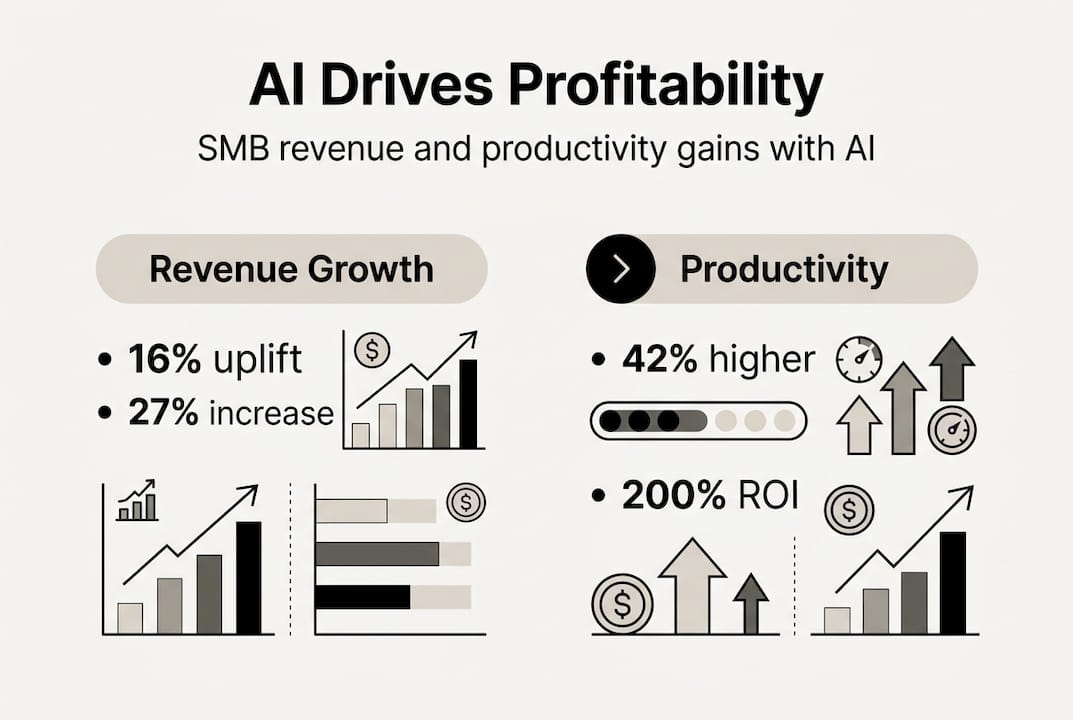
The results from this approach are well-documented. SMB AI ROI ranges from 200% to 1,893% over 24 months, with a 42% productivity lift and 27% revenue growth reported across studies. Those numbers are not outliers. They reflect disciplined, incremental implementation.
The broader picture is equally encouraging. 91% of SMBs using AI report increased revenue, and 80% report measurable productivity gains. These are not large enterprises with dedicated IT teams. These are businesses like yours.
Pro Tip: Track one metric per workflow for the first 30 days. Time saved, leads responded to, or invoices processed. A single clear number tells you whether the tool is working and gives you the confidence to expand. Use the AI productivity improvement guide to structure your measurement approach, and explore boosting operational efficiency for sector-specific examples.
Once AI is working for you, how do you verify results and avoid common missteps?
Troubleshooting AI adoption: Common pitfalls and how to avoid them
Even well-intentioned AI projects run into trouble. Knowing the failure patterns in advance puts you ahead of the majority of SMBs who learn these lessons the hard way.
The most common stumbling blocks are:
- Poor planning: Jumping into a tool without mapping the workflow it is meant to replace
- Bad data: Feeding an AI tool inconsistent, incomplete, or outdated information and expecting reliable output
- Unclear goals: Deploying automation without a specific metric you are trying to move
- Lack of training: Expecting your team to adopt a new tool without a brief onboarding session
- No ownership: Letting a tool run without a designated person responsible for monitoring it
Remember: 67% of SMB AI projects fail because of poor strategy, data issues, and skills gaps, not because the technology does not work. Preparation is the differentiator.
Data quality deserves special attention. An AI scheduling tool fed with a messy calendar will create messy schedules. A customer support bot trained on vague FAQs will give vague answers. Clean your data before you automate it. This step alone eliminates a significant portion of implementation failures.
For additional context on median AI ROI data, the dataset shows an 82.5% success rate among businesses that followed structured implementation. The common thread in successful projects is not the tool chosen. It is the discipline applied.
Pro Tip: Assign a clear owner for every AI workflow you deploy. This person does not need to be technical. They need to check the tool weekly, flag anomalies, and communicate results to the team. Ownership creates accountability, and accountability drives results. Explore boosting efficiency with AI tips for a practical checklist you can hand directly to that person.
Reflecting on these lessons, here is what most guides miss about AI-driven profitability.
The uncomfortable truth about boosting profitability with AI
Most SMBs do not fail at AI because the tools are too complex. They fail because they expect transformation without commitment. They install a tool, use it inconsistently for two weeks, see mixed results, and conclude that AI is not for them. That is not a technology problem. That is a follow-through problem.
The biggest barrier is not technology. It is mindset and consistency. Businesses that treat AI as a discipline, not a shortcut, are the ones compounding gains month over month.
The evidence backs this up. AI investments are linked to a 20% sales growth difference and increased employment, with no widespread job loss. AI does not replace your team. It frees them to do higher-value work, which actually improves morale and retention.
The businesses winning with AI are not the most technical. They are the most patient. They pick one workflow, nail it, and move to the next. That incremental discipline is what separates the 33% who succeed from the 67% who do not. Explore boosting profitability with automation to see how that patient, systematic approach plays out across different business models.
Start boosting profitability with AI solutions
You now have the framework. The next step is putting it into action with tools built specifically for businesses like yours. HumanOS combines a full suite of AI agents with managed web services, designed so you can start automating without writing a single line of code or handing over a credit card.

Whether you need to automate email management, streamline scheduling, or build a conversion-focused website that works around the clock, the HumanOS platform has a solution sized for your stage of growth. From solopreneurs to multi-location operators, our AI web services are built to deliver at least a 30% improvement in productivity and profitability, with guaranteed results and a three-day free trial to get you started.
Frequently asked questions
How much can AI realistically boost profitability for a small business?
SMBs using AI report revenue increases of 16% to 27% and productivity jumps of up to 42%, with ROI ranging from 200% to 1,893% over 24 months depending on the workflows automated.
What is the typical cost for SMB-friendly AI tools?
Most tools start at $20 to $50 per month and deliver payback within two to six months, making them accessible even for businesses with tight operating budgets.
What are the main reasons SMB AI projects fail?
67% of AI projects fail due to poor strategy, data quality issues, and skills gaps, meaning most failures are preventable with proper planning and clear ownership.
How long until AI delivers ROI?
Most SMBs see positive ROI within two to six months, and the median ROI over 24 months sits at 159.8%, with an 82.5% success rate among businesses that follow a structured implementation process.
Does AI adoption mean job losses for SMB teams?
AI investments are consistently linked to sales growth and increased employment, not widespread job loss, as automation frees teams to focus on higher-value, revenue-generating work.