

TL;DR:
- Accurate, AI-powered time tracking reduces errors and improves productivity visibility.
- Proper setup, team involvement, and regular review are essential for workflow success.
- Cultural acceptance and transparent communication are crucial for sustainable automation.
If your team is still piecing together timesheets at the end of the week, you are leaving real money on the table. Scattered logs, forgotten entries, and disconnected tools quietly drain hours from your operation every single month. For small and mid-sized businesses, that loss compounds fast. This guide walks you through exactly how to build a smarter time tracking workflow process using AI and automation, from the tools you need to the steps that make it stick. By the end, you will have a clear, actionable plan to reclaim your time and run a tighter, more profitable operation.
Table of Contents
- Why your time tracking workflow process matters
- What you need: Tools and prerequisites for an AI-powered workflow
- Step-by-step: Building your time tracking workflow process
- Troubleshooting and refining your workflow
- The untold truth: Workflow automation is only half the battle
- Take your workflow to the next level with AI tools
- Frequently asked questions
Key Takeaways
| Point | Details |
|---|---|
| Workflow matters | A smooth time tracking workflow directly boosts productivity and accuracy. |
| AI saves time | AI-driven automation tools can recover up to 25 hours weekly for SMBs. |
| Proper preparation | Having the right tools, clear data, and team buy-in ensures smoother automation. |
| Step-by-step implementation | Following a clear process ensures seamless system adoption and results. |
| Continuous improvement | Regularly reviewing and updating your workflow maximises gains and reduces errors. |
Why your time tracking workflow process matters
Most business owners think of time tracking as a formality. You log hours, run payroll, repeat. But that mindset is costing you more than you realise. When your workflow is fragmented, you are not just dealing with admin headaches. You are losing visibility into where your team's energy actually goes, and that makes smart decisions nearly impossible.
Accurate time tracking is fundamental for boosting SMB productivity. When you know exactly how time is being spent across projects, clients, and tasks, you can spot waste, reallocate resources, and price your services with confidence. That kind of clarity is not a luxury. It is a competitive advantage.
AI-powered tools change the game entirely. Instead of relying on staff to remember what they worked on three days ago, automation captures activity in real time. It reduces the admin overhead that bogs down managers and cuts the errors that lead to billing disputes or payroll mistakes. The result is a leaner, more accurate operation.
Here is what a well-built time tracking workflow actually delivers:
- Payroll accuracy: Automated logs eliminate manual errors and reduce disputes
- Billing transparency: Clients see exactly what they are paying for, which builds trust
- Real-time insights: Managers can act on current data, not last week's guesses
- Productivity clarity: You can see which tasks consume the most time and adjust accordingly
- Reduced admin overhead: Less time spent chasing timesheets means more time on actual work
Improving productivity with time tracking is not about micromanaging your team. It is about giving everyone, including leadership, a shared view of where effort is going. That shared view is what makes better decisions possible.
"The businesses that grow fastest are not the ones working the longest hours. They are the ones who know exactly where every hour goes and act on that knowledge consistently."
When you pair that visibility with measuring business productivity across departments, you start to see patterns that manual tracking simply cannot reveal. That is where AI earns its keep.
What you need: Tools and prerequisites for an AI-powered workflow
Before you automate anything, you need the right foundation. Jumping into a new tool without preparing your team or your data is one of the most common reasons these projects stall. Here is what to have in place before you start.
Essential tools:
| Tool category | Purpose | Examples |
|---|---|---|
| AI-driven tracking app | Automates time logging and reporting | Toggl Track, Clockify, Harvest |
| Cloud storage | Centralises data for team access | Google Drive, OneDrive, Dropbox |
| Workflow connector | Integrates tools and triggers automations | Zapier, Make, n8n |
| Payroll or billing platform | Syncs tracked time to invoices and pay runs | QuickBooks, FreshBooks, Xero |
Data and information you need ready:
- A clear map of your team structure and who tracks what
- A list of active projects, clients, and task categories
- Historical timesheets, even rough ones, to establish a baseline
- Any existing billing or payroll rules that need to carry over
AI productivity tools for SMBs can save 15 to 25 hours weekly, but only when the setup is done right. Rushing past the prep stage is how businesses end up with two systems that do not talk to each other and a team that ignores both.
One thing that gets overlooked consistently: involve your team early. People resist tools they feel were imposed on them. A short kickoff conversation explaining the why behind the change goes a long way toward genuine adoption.
Pro Tip: Connect your time tracking tool directly to your payroll and billing platforms from day one. Avoiding double entry is not just a convenience. It eliminates a whole category of human error that quietly inflates admin costs over time. Review effective time tracking strategies to find the integration approach that fits your current stack.

Step-by-step: Building your time tracking workflow process
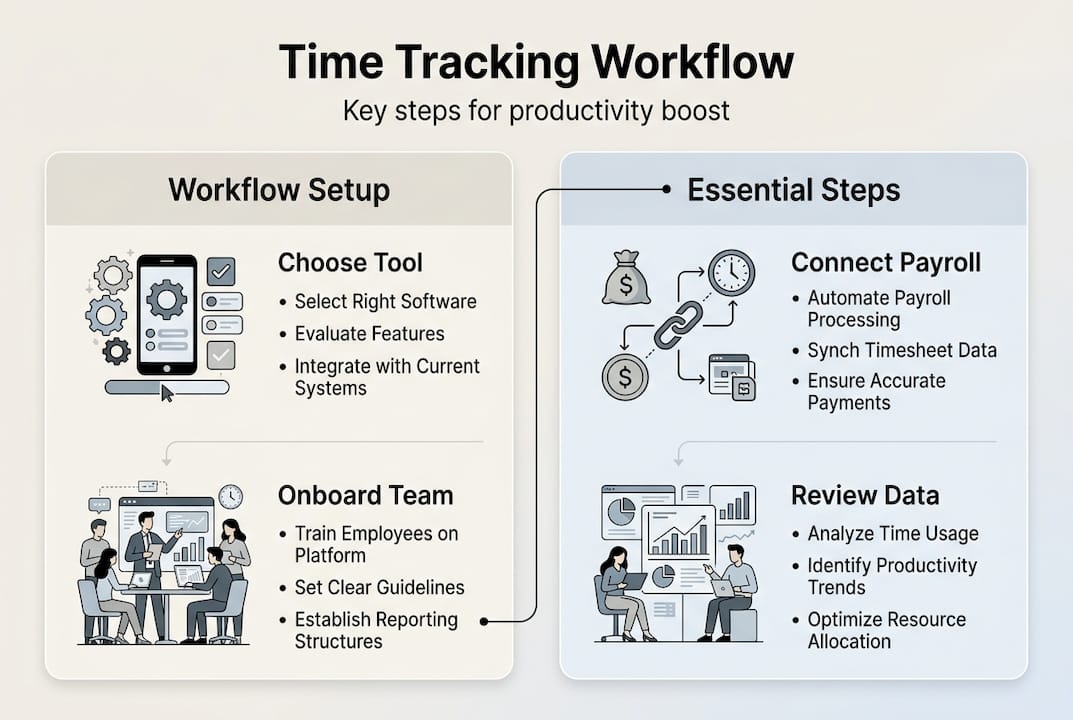
With your tools selected and your team informed, it is time to build. Follow these steps in order. Skipping ahead is tempting, but each phase sets the foundation for the next.
-
Select and configure your software. Choose a tool that fits your team size and integrates with your existing platforms. Set up your project categories, client codes, and billing rates before anyone logs a single minute.
-
Onboard your team with a live walkthrough. Do not send a tutorial link and hope for the best. Run a short session, show the tool in action, and answer questions in real time. This is the single biggest factor in adoption success.
-
Map your core workflows. Identify the five to ten task types your team handles most often. Build tracking templates or tags for each one so logging is fast and consistent across the board.
-
Set up automated notifications and reminders. Use your workflow connector to trigger end-of-day reminders for anyone who has not logged time. Automate weekly summary reports to managers so nothing slips through.
-
Integrate with payroll and billing. Once tracking is live, connect it to your financial tools. Test the sync with a small batch before running a full payroll cycle.
-
Review your first two weeks of data. Look for gaps, inconsistencies, and tasks that are taking far longer than expected. Use this as your baseline for improvement.
Automating time tracking can increase real-time accuracy and cut manual data entry by over 30%. That is not a minor efficiency gain. For a team of ten, that can translate to hours of recovered capacity every single week.
Pro Tip: Enable cross-device tracking so your team can log time from mobile, desktop, or tablet without friction. Pair this with automated scheduling for small business to keep calendar blocks and time entries aligned automatically.
Stat to know: Businesses that automate time tracking report up to 30% fewer billing errors and a measurable reduction in payroll disputes within the first quarter of implementation.
Troubleshooting and refining your workflow
Even a well-built workflow hits friction. The goal is not perfection on day one. It is building a system that gets better every week. Here is how to handle the most common problems.
Common mistakes to watch for:
- Staff skipping log entries because the process feels like extra work
- No one reviewing the reports that automation generates
- Workflows set up once and never revisited as the business evolves
- Tracking categories that are too broad to provide useful insight
- Managers not modelling the behaviour they expect from their teams
Manual vs. AI-driven time tracking: A quick comparison
| Factor | Manual tracking | AI-driven tracking |
|---|---|---|
| Entry accuracy | Prone to memory gaps | Captured in real time |
| Admin time | High, weekly reconciliation | Minimal, automated sync |
| Reporting speed | Hours to compile | Instant dashboards |
| Error rate | Frequent | Significantly reduced |
| Scalability | Breaks down as team grows | Scales without extra admin |
Once you have two to four weeks of data, schedule a short review session with your team. Look at what is working, what is being skipped, and where the categories need refinement. This does not need to be a long meeting. Thirty minutes of focused review is enough to surface the most important adjustments.
Workflow automation tips consistently show that regular reviews and adjustments maximise the gains of automation. A system that is never revisited will drift. A system that is reviewed monthly will keep improving.
"Data without action is just noise. The businesses that win with automation are the ones that build a habit of reviewing what the data is telling them and responding quickly."
For a structured approach to ongoing improvement, the productivity improvement with AI framework gives you a repeatable method to assess, adjust, and scale your gains over time.
The untold truth: Workflow automation is only half the battle
Here is something most guides will not tell you: the tool is rarely the problem. We have seen businesses implement best-in-class automation and still see flat results six months later. The reason is almost always cultural, not technical.
Automation surfaces the truth about how your business operates. If leadership is not reviewing the data, the team stops trusting the process. If managers are not modelling consistent time logging, staff will not either. The technology can only amplify the habits that already exist in your organisation.
The fear around automation is real too. Some team members worry that accurate tracking means surveillance. Addressing that directly, with transparency about how data will and will not be used, is not optional. It is the difference between a workflow that lasts and one that quietly gets abandoned.
Building AI for team productivity into your culture means treating automation as a shared tool, not a management weapon. When your team sees that the data helps them work smarter and get paid accurately, resistance drops fast. Consistent communication and honest feedback loops are what make the gains sustainable.
Take your workflow to the next level with AI tools
You now have the framework to build a time tracking workflow that actually works. The next step is putting it into motion with tools built specifically for businesses like yours.

HumanOS brings AI-powered automation to your entire operation, including time tracking, scheduling, document processing, and more, all through a self-guided onboarding system that requires no coding. Our AI automation for workflows is designed for small and mid-sized businesses ready to stop patching things together and start running with real infrastructure. On average, our clients see an 80% boost in productivity and a 30 to 50% lift in profitability. Start exploring the HumanOS platform today. No credit card required.
Frequently asked questions
What is a time tracking workflow process?
A time tracking workflow process is a structured method for recording and managing employee work hours and tasks using coordinated steps and tools. Clear workflows reduce admin time and errors, making operations more efficient for SMBs.
How does AI improve time tracking workflows?
AI automates time logging, detects patterns, and integrates data across platforms for accurate, hands-off tracking. AI-driven tools can save SMBs 15 to 25 hours weekly by eliminating manual entry and reconciliation.
What should I look for in time tracking software for my business?
Prioritise software with AI capabilities, easy team onboarding, and the ability to automate reports and integrate with payroll or billing systems. AI and automation simplify time tracking and enhance SMB productivity when the right tool is chosen.
How can I ensure my team adopts the new workflow process?
Get buy-in by explaining the benefits clearly, offering hands-on training, and creating space for ongoing feedback. Training and communication are the key drivers of successful workflow changes in small and mid-sized businesses.
Recommended
- Boost productivity: time tracking software for small businesses
- Streamline your small business with automated scheduling
- Top workflow automation tips to boost SMB productivity
- Step-by-step productivity improvement with AI: SMB guide
- 10 productivity hacks for personal trainers: automate & engage | TrainingPro