

TL;DR:
- Most SMBs should start AI implementation by assessing their workflows, data, and pain points to ensure readiness. Conducting focused pilots with low-cost tools helps measure tangible improvements before scaling cautiously and safeguarding data. A structured, iteration-based approach ensures safe, effective AI integration that boosts productivity and profitability over time.
AI is everywhere right now, and the pressure to adopt it is real. But for most small and mid-sized business owners, the bigger problem isn't access to tools — it's knowing where to start without blowing your budget or your team's patience. Plenty of SMBs have already lost time and money chasing AI solutions that didn't fit their workflows or their goals. This guide cuts through the noise and walks you through exactly how to assess your readiness, run a focused pilot, protect your data, and scale AI adoption in a way that delivers measurable productivity and profitability gains from day one.
Table of Contents
- Determine your AI readiness and pick the right starting points
- Pilot practical AI tools with targeted workflows
- Safeguard data and manage AI risks from day one
- Integrate, measure, and expand AI for greater ROI
- Why SMB AI integration works best with focus, not scale
- Ready to power up your business with streamlined AI integration?
- Frequently asked questions
Key Takeaways
| Point | Details |
|---|---|
| Start small for success | Begin with a focused pilot in a repeatable workflow before scaling AI across your business. |
| Prioritise measurable gains | Choose workflows where AI-driven improvements are clear and easy to track, like text-heavy tasks. |
| Manage risks proactively | Follow basic risk management and data protection practices from the start to build trust and avoid pitfalls. |
| Iterate for sustained ROI | Continuously track results and expand AI integration only when pilots deliver clear value. |
Determine your AI readiness and pick the right starting points
Now that you understand why a careful approach is critical, let's get specific about where to begin and what you need to have in place.
Before you touch a single AI tool, you need an honest picture of where your business stands. Readiness isn't about technical sophistication — it's about knowing your workflows, your data, and your biggest pain points well enough to make a smart first move. Many SMBs jump straight to demos and trials without this groundwork, which is exactly why so many AI pilots stall or fail quietly.
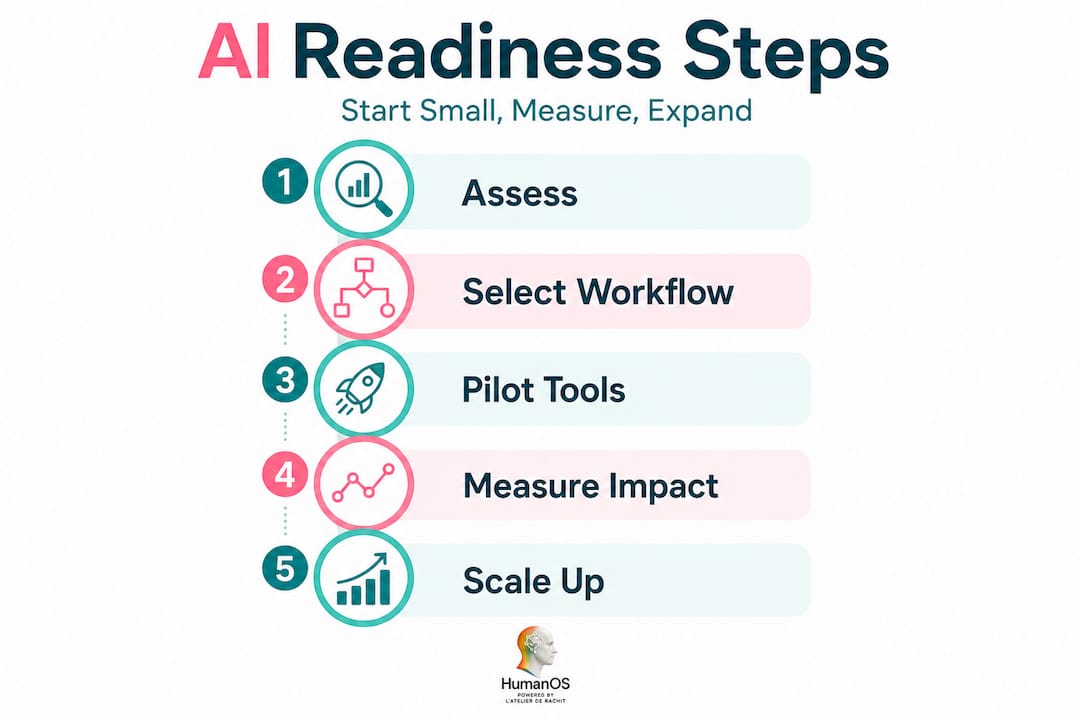
The SBA guidance explicitly calls for starting small, testing free or low-cost tools, focusing on repeatable tasks, and safeguarding data. That's not timid advice — it's the foundation of every sustainable AI integration we've seen succeed.
Here's a practical readiness checklist to run through before choosing your first AI tool:
- Workflow type: Is the task text-heavy, repetitive, and rules-based? These are ideal starting points.
- Internal pain points: What's costing your team the most time each week? Email sorting, customer replies, scheduling, report writing?
- Available data: Do you have organised, accessible data the AI can actually use, such as customer records, past emails, or product catalogues?
- Budget: Can you commit to a free or low-cost pilot without needing board approval?
- Security needs: Does the workflow involve sensitive customer data, financial records, or proprietary information?
The best starting workflows for most SMBs are those already touching boosting SMB productivity daily. Think email management, customer support responses, appointment scheduling, and document summarisation. These tasks are high-volume, low-complexity, and easy to measure. They're also the workflows where AI tends to deliver the fastest, most visible results.
| Readiness factor | What to assess | Green light signal |
|---|---|---|
| Workflow repeatability | Does the task follow a consistent pattern? | Same inputs and outputs most of the time |
| Data accessibility | Is your data organised and retrievable? | Structured files, CRM records, or email archives |
| Security requirements | What data does the workflow touch? | Non-sensitive or properly anonymised data |
| Team skill level | Can staff use basic software tools? | Comfortable with email and cloud apps |
| Measurement capability | Can you track time, errors, or volume? | Existing logs or simple before/after tracking |
Research confirms that AI boosts productivity especially for less-proficient users in knowledge-heavy tasks — which means your team doesn't need to be tech-savvy to see real gains. That's an encouraging starting point for most SMBs.
Pro Tip: Choose a workflow where improvements are easy to measure from day one. Time saved per task, error rates, or customer response times are all concrete metrics that will help you prove value and build internal support for expanding AI later.
Pilot practical AI tools with targeted workflows
With your starting workflow and readiness checklist complete, you're ready to try your first AI pilot in a focused and low-risk way.
A pilot doesn't mean a half-hearted test. It means running a structured, time-limited experiment on one specific workflow to see what AI can actually do for your business. The goal isn't perfection — it's evidence. Here's a step-by-step approach that works for SMBs at any stage:
- Select one workflow. Pick the task that scored highest on your readiness checklist. Be specific — not "customer service" but "responding to common product questions via email."
- Choose a tool with a free or low-cost entry point. There are many time-saving AI productivity tools available for SMBs that let you run a real pilot without significant upfront cost.
- Set a pilot window. Two to four weeks is usually enough to see meaningful trends without over-committing.
- Measure results from the start. Track time spent on the task before and after AI assistance. Note error rates, customer satisfaction scores, or volume handled per hour.
- Collect team feedback. Ask the people actually using the tool what's working and what's frustrating. Their input is data too.
- Decide and document. At the end of the pilot, write a one-page summary: what improved, what didn't, and what you'd change in the next round.
"Start small with AI, pilot and test free or lower-cost tools, and focus on repeatable workflows while safeguarding data." — U.S. Small Business Administration
The workflows that consistently show the fastest gains are text-based and knowledge-intensive. According to recent research, AI assistance significantly increased productivity for tasks involving writing, reading, and customer communication — including faster completion times and a higher likelihood of finishing complex assignments. For SMBs, that translates directly into faster email responses, cleaner proposals, and more consistent customer service without hiring additional staff.
You can find additional AI efficiency tips tailored specifically for SMBs looking to make the most of their first pilot. The key is staying narrow. Resist the urge to test three tools at once or expand scope mid-pilot. Focus wins every time.

Pro Tip: Record your baseline metrics before the pilot begins — not after. It sounds obvious, but most teams skip this step, which makes it impossible to prove ROI later when you're ready to scale up.
Safeguard data and manage AI risks from day one
Before moving to full-scale adoption, it's essential to ensure that your pilot is safe, compliant, and doesn't expose your business to unnecessary risk.
Data security isn't a checkbox you tick after the AI is working. It's a condition of starting at all. Even in a small pilot using a free tool, you're making decisions about what data the AI can see, store, and process. Get this wrong early and you create problems that are much harder to fix at scale.
The SBA recommends planning for data protection and security as a core part of AI adoption, not an afterthought. Here's a practical set of baseline safeguards every SMB should put in place before their first pilot goes live:
- Clarify data ownership. Who owns the outputs the AI generates? Make sure your tool's terms of service don't claim rights to your business content.
- Minimise data sharing. Only share the data the AI actually needs for the specific task. Don't connect tools to your entire CRM if only email templates are being generated.
- Set access controls. Limit which team members can interact with the AI tool and what data they can feed into it.
- Conduct regular audits. Schedule a monthly check to review what data has been processed and whether any sensitive information has been inadvertently shared.
- Document your decisions. Keep a simple log of which tools are in use, what data they access, and who approved it.
"The NIST AI Risk Management Framework is voluntary, rights-preserving, non-sector-specific, and use-case-agnostic, intended to help organisations manage AI risk via a structured approach across the AI lifecycle."
The NIST AI RMF applies to businesses of all sizes, including yours. You don't need a dedicated IT team to follow its principles. The framework encourages you to identify, govern, map, measure, and manage AI risks — which at the SMB level means simply knowing what your tools can do, what they shouldn't do, and who's responsible for monitoring them. An AI data analysis guide can also help you understand how to structure data inputs safely without inadvertently exposing sensitive records.
The most common risk at this stage isn't a dramatic security breach. It's quiet data leakage — staff members pasting sensitive client information into public AI tools without realising those inputs may be stored or used for model training. Clear policies and brief team training sessions resolve this almost entirely.
Integrate, measure, and expand AI for greater ROI
Once you're confident in your AI pilot's impact and safety, it's time to connect the steps, scale, and gain even greater value.
Moving from a pilot to full integration is where most SMBs either accelerate or stall. The difference almost always comes down to structure. Businesses that expand AI in deliberate, reviewable iterations consistently outperform those that attempt large-scale rollouts all at once. The SBA advises expanding in iterations with ongoing review and explicit planning for data protection at every stage.
Here's how the same workflow evolves across each stage of adoption:
| Stage | Workflow example | Key activity | Success measure |
|---|---|---|---|
| Pilot | AI drafts email replies | Test on 20% of volume | Time per response, accuracy |
| Integrated | AI handles all standard replies | Full deployment with human review | Response rate, error frequency |
| Scaled | AI manages multi-channel support | Connected to CRM, reporting live | Customer satisfaction score, cost per ticket |
To move successfully from one stage to the next, follow this checklist:
- Review pilot results honestly. Did the AI deliver measurable improvement? If yes, document the conditions that made it work.
- Assign an AI owner. Designate one person responsible for monitoring performance, catching errors, and flagging issues in the integrated workflow.
- Build a feedback loop. Create a simple weekly or biweekly check-in where the AI owner reviews outputs and collects team observations.
- Expand scope incrementally. Once the integrated workflow is stable, identify the next highest-value task and repeat the pilot process.
- Review risks before each expansion. New workflows may introduce new data types or access requirements. Recheck your security baseline each time.
Measuring operational efficiency with AI at each stage is what separates businesses that compound their gains from those that plateau. Use your metrics to build a quarterly picture of time saved, cost reduced, and revenue influenced by AI-assisted workflows. That data becomes your roadmap for where to invest next.
A practical AI profitability guide can help you frame those numbers in terms of bottom-line impact, which is ultimately what makes the case for continued investment in your AI infrastructure.
Pro Tip: Assign a named AI owner — not a committee, not a shared responsibility. One person tracks results, escalates problems, and champions the next iteration. Without ownership, AI monitoring quietly disappears from everyone's priority list within weeks.
Why SMB AI integration works best with focus, not scale
Here's something we've observed consistently working with small and mid-sized businesses: the ones that struggle most with AI aren't the ones who move too slowly. They're the ones who move too wide.
"Shiny object" syndrome is real in AI adoption. A new tool launches every week, each promising to automate everything, and it's genuinely tempting to chase them. The problem is that breadth kills measurability. If you're running five AI tools across six workflows simultaneously, you have no idea which one is actually driving your results. You can't improve what you can't isolate.
The businesses we've seen succeed with AI share a surprisingly consistent pattern. They pick one workflow. They run a clean pilot. They measure rigorously. They document what worked and why. Then they expand to the next workflow and repeat the cycle. It's not glamorous, but it compounds beautifully. Within six to twelve months, those businesses are running multiple integrated AI workflows, each one proven and monitored, rather than a sprawling collection of half-used tools.
The other failure mode is skipping measurement entirely. Plenty of SMBs adopt an AI tool, feel like it's helping, and never actually confirm that with data. That intuition might be right — but without proof, you can't justify scaling, you can't identify what needs improving, and you can't build organisational confidence in the technology.
Effective SMB AI productivity strategies are built on a cycle: pilot, review, integrate. Not a big-bang rollout. Not an all-in-one platform purchased before you've proven a single workflow. The focus-first approach is slower to start and dramatically faster to scale. That's not a paradox — it's just how durable business systems get built.
Ready to power up your business with streamlined AI integration?
If this guide has shown you anything, it's that AI integration doesn't have to be overwhelming or expensive to deliver real results. The steps are clear, the tools are accessible, and the gains are measurable.

HumanOS is built specifically for SMBs ready to move from pilot to full operational integration without the guesswork. Our AI Operating System for Humans combines a suite of AI agents covering email management, scheduling, document processing, customer support, and more, all deployed through a self-guided onboarding system that requires no coding and no credit card to start. You can explore automated AI agents designed to fit directly into your existing workflows, and if your web presence needs the same level of rigour, our AI web services division handles that too. Backed by a BBB A-rating and a guaranteed 30% productivity and profitability improvement, we're ready to help you take the next step.
Frequently asked questions
What's the lowest-risk way for SMBs to start using AI?
Start small with one repeatable, text-heavy workflow using free or low-cost tools, and measure your results before scaling up. SBA guidance is clear that this focused approach is the most sustainable path to lasting AI adoption.
Which workflows see the biggest gains from AI integration?
Text-centric tasks like drafting emails, sorting customer queries, or producing content summaries typically see the greatest productivity gains. Research confirms that AI assistance increased productivity significantly for knowledge-based, text-heavy work, including faster completion times and higher task-completion rates.
Do small businesses need a special risk management plan for AI?
Yes — even basic pilots benefit from following a structured AI risk management approach. The NIST AI RMF is designed to help organisations of any size manage AI risk across the full lifecycle, and its principles translate directly to SMB-scale pilots.
Is it possible for SMBs to scale AI successfully without a large IT team?
Absolutely. By running focused pilots, measuring outcomes consistently, and expanding in structured iterations, SMBs can scale AI safely and effectively with minimal technical resources. The SBA's AI guidance is built precisely for businesses without large IT departments, emphasising practical, accessible steps over technical complexity.