

TL;DR:
- Most SMBs mistakenly think Qualcomm AI Engine is only for large tech teams, which limits their benefits. The accessible no-code tools, real-device profiling, and automated deployment can boost productivity and cut costs across various business operations. By leveraging Qualcomm's on-device AI hardware and SDKs, small businesses can automate tasks like inventory management, customer support, and quality control without relying on cloud connectivity or extensive technical expertise.
Most small and mid-sized business owners hear "Qualcomm AI Engine" and immediately assume it's a tool for semiconductor engineers or Fortune 500 device teams. That assumption is costing them real money. Qualcomm's on-device AI infrastructure has quietly matured into something far more accessible, with no-code toolkits, real-device profiling, and automated model deployment pipelines that any motivated operator can use. This article breaks down what the Qualcomm AI Engine actually is, how its workflow operates in plain language, where businesses hit snags, and how to convert this technology into tangible productivity gains and operational savings your competitors haven't discovered yet.
Table of Contents
- What is the Qualcomm AI Engine?
- The Qualcomm AI Engine workflow made simple
- Avoiding common pitfalls: Validation, profiling, and real-world results
- Maximising your business value: Practical strategies for SMBs
- Perspective: Why most SMBs overlook the practical value of the Qualcomm AI Engine
- Next steps: Bring AI-driven automation to your business
- Frequently asked questions
Key Takeaways
| Point | Details |
|---|---|
| Easy SMB access | Qualcomm AI Engine and Workbench let you deploy and optimize AI without deep technical skills. |
| Flexible toolchain | Choose SNPE, QNN, or GENIE based on project needs for better control or ease-of-use. |
| Real business impact | AI on-device can boost productivity, automate tasks, and reduce ongoing costs. |
| Validate outputs | Always profile and validate models on your actual hardware to ensure real-world accuracy. |
| Get started fast | All-in-one platforms and Workbench let you try AI benefits in days, not months. |
What is the Qualcomm AI Engine?
Now that you know these tools are accessible, let's define exactly what the Qualcomm AI Engine is and why it matters for your business.
In Qualcomm's terminology, "AI Engine" refers to the AI hardware block inside Qualcomm system-on-chips (SoCs), specifically the neural processing unit (NPU) and digital signal processor (DSP). The software side is organised under the Qualcomm AI Runtime (QAIRT), which provides the tools to run AI models efficiently on that hardware. Think of the hardware as the engine and QAIRT as the transmission that puts it to work.
Several Snapdragon processors integrate the "Qualcomm AI Engine (NPU & DSP)" with quantified peak AI compute reaching up to 12 dense TOPS (Tera Operations Per Second). That's a meaningful number because it determines how fast an AI model can make decisions on a device, whether that device is a point-of-sale terminal, a smart camera, or a field tablet used by your service team.
For business owners, the hardware and software requirements are less important than understanding what three software development kits (SDKs) are available and which one fits your use case.
Key hardware features of the Qualcomm AI Engine:
- Dedicated NPU for neural network inference, separate from the CPU and GPU
- DSP integration for efficient signal and sensor data processing
- Up to 12 dense TOPS of AI compute on supported Snapdragon processors
- Support for quantised models (INT8, FP16) to reduce memory use and improve speed
- On-device processing that keeps data local, avoiding cloud latency and privacy risk
Common business use cases:
- Automated quality inspection using on-device vision models
- Real-time customer sentiment analysis at the edge
- Smart inventory monitoring with predictive restocking triggers
- Voice-activated workflow commands on field devices
- Offline-capable AI assistants for remote or bandwidth-limited locations
Here's a comparison of the three main SDKs to help you understand which fits your needs:
| SDK | Best for | Technical level | Key feature |
|---|---|---|---|
| SNPE (Snapdragon Neural Processing Engine) | Simpler deployments, faster start | Low to medium | Streamlined model conversion and inference |
| QNN (Qualcomm Neural Network) | Fine-grained hardware control | Medium to high | Granular operator-level tuning |
| GENIE | Generative AI and language models | Low to medium | Optimised for large language model inference |
Understanding AI model deployment basics doesn't require a computer science degree. SNPE is your starting point if you want results fast. QNN is for teams that want to squeeze every millisecond out of the hardware. GENIE is built for generative AI, including on-device chatbots and language understanding tools.
The Qualcomm AI Engine workflow made simple
With the basics covered, let's break down how SMBs can actually put Qualcomm's AI Engine to work in their organisation. No PhD required.
The QAIRT workflow involves converting AI models using command-line interface (CLI) tools, writing a lightweight application using the SDK's API, transferring the model and runtime to the target device, running inferences, and then benchmarking and optimising performance. That sounds like a lot. And historically, it was.
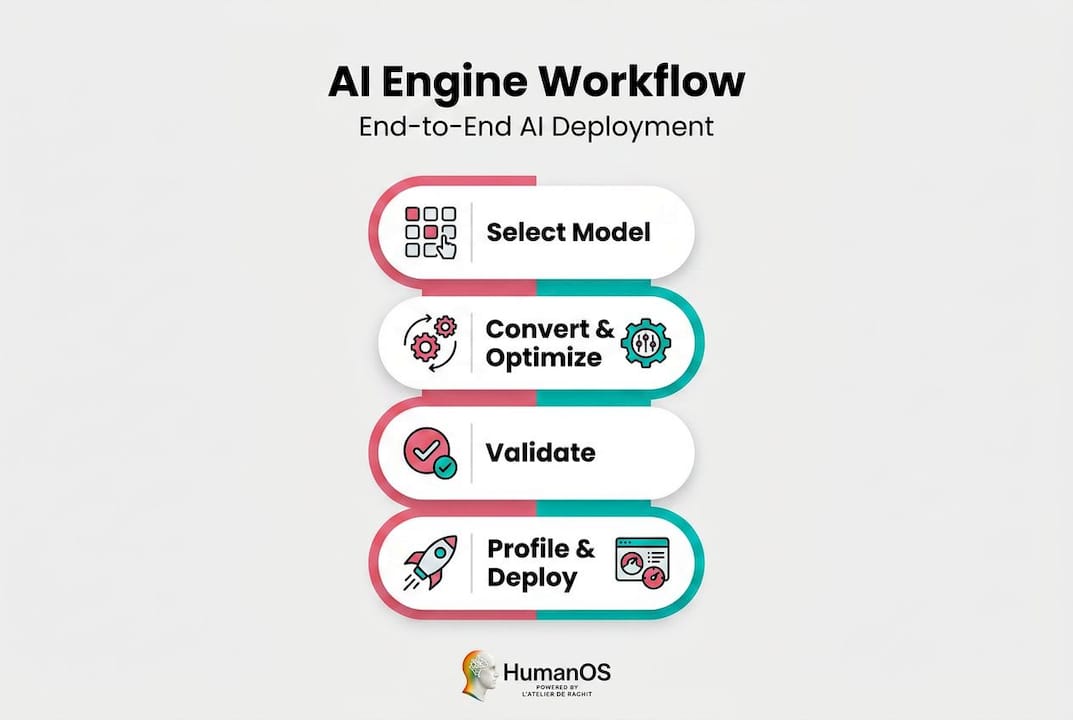
That's where Qualcomm AI Hub Workbench changes everything. AI Hub Workbench is a less-technical entry point that automatically handles model translation from source framework to device runtime, applies hardware-aware optimisations, and runs real-hardware profiling and numerical validation. You don't need to manage low-level conversion details manually. The platform does it for you.
Here's the step-by-step AI onboarding process for deploying a model through the Qualcomm AI Engine:
- Choose your SDK. Start with SNPE for most business applications, GENIE if you're using language or generative AI models.
- Select or import your AI model. Use a pre-trained model from a standard repository or bring your own fine-tuned version.
- Convert and compile the model. In Workbench, this is automated. In a manual workflow, you use CLI tools provided in the QAIRT package.
- Run hardware-aware optimisation. Workbench applies quantisation and layer mapping automatically to maximise performance on your specific Snapdragon chip.
- Deploy to a real device. Transfer the compiled model and runtime to your target hardware (tablet, kiosk, camera, mobile device).
- Profile and benchmark. Review latency, memory usage, and layer execution reports from real-device testing.
- Validate outputs. Compare on-device results against reference outputs to confirm accuracy hasn't been compromised.
- Iterate and refine. Use the profiling data to identify bottlenecks and improve performance before full-scale rollout.
| Workflow step | Tools required | Automated by Workbench? |
|---|---|---|
| Model selection | Model repository or custom file | Partial |
| Conversion and compilation | CLI tools or Workbench | Yes |
| Hardware optimisation | QNN/SNPE tuning parameters | Yes |
| Device deployment | Device runtime, USB or OTA transfer | Partial |
| Real-device profiling | AI Hub Workbench dashboard | Yes |
| Output validation | Numerical comparison tools | Yes |
To improve AI workflows right from the start, focus on the profiling report before you commit to full deployment. It's the fastest way to spot whether a model will actually perform at the speed your workflow needs.

Pro Tip: Use AI Hub Workbench's real-device profiling report before rolling out to your whole fleet. The report shows you latency per layer, memory consumption, and whether any operations fell back to the CPU instead of the NPU. If more than 20% of layers are running on CPU, you have an optimisation opportunity that could cut processing time in half.
Avoiding common pitfalls: Validation, profiling, and real-world results
Understanding the workflow is great, but real value comes from knowing where businesses hit snags in the wild. Here's what to watch for when deploying your first models.
Quantization mismatches and unsupported operations are among the most common causes of failed validation or incorrect inference outputs. Quantization is the process of reducing a model's numerical precision to make it smaller and faster. When it's done incorrectly, or when the model uses an operation the hardware doesn't fully support, the results can be silently wrong, meaning the model runs but produces bad outputs without throwing an obvious error.
Published speedups and benchmarks depend heavily on model architecture coverage, quantization choices, and correct post-processing. This means the performance numbers you read in a spec sheet are best-case figures, not guaranteed results in your specific environment.
Typical validation and profiling issues SMBs encounter:
- Model fails to compile because it contains unsupported operations for the target hardware
- Output accuracy drops significantly after quantization, making results unreliable for business decisions
- Latency in production is higher than benchmark figures because the model runs partially on CPU instead of NPU
- Memory usage exceeds device limits, causing the app to crash or slow down other processes
- Post-processing code is applied incorrectly, distorting the model's actual outputs
- Validation passes in simulation but fails on real hardware due to firmware or driver differences
Treat every device benchmark as an upper bound on performance, not a floor. Real-world deployment always introduces variables that benchmarks don't capture: thermal throttling, background processes, varying input complexity, and driver-level differences across firmware versions. Build your business case on conservative estimates, then let the real metrics prove you right.
Pro Tip: Before you rely on any AI model for a critical business workflow, such as flagging inventory shortages or routing customer queries, run output validation tests across a diverse sample of real inputs. A model that's 95% accurate on test data can fail unexpectedly on edge cases that show up constantly in production.
The validation step is not optional. Skipping it is how businesses build brittle automations that erode trust in AI across the organisation. Get it right once, and you'll have a reliable foundation you can build on confidently.
Maximising your business value: Practical strategies for SMBs
Avoiding obstacles sets you up for success. Here's how to convert your AI investment powered by Qualcomm AI Engine into everyday business value.
The most practical starting point for non-experts is to use AI Hub Workbench to compile, validate, and deploy models without managing low-level conversion and runtime details manually. Once deployed, use the reported on-device metrics including latency, memory, and layer mapping to decide where the return on investment (ROI) is strongest in your workflow automation.
The business case is straightforward. Every task that previously required a person to monitor a screen, review a report, or make a routine decision becomes a candidate for AI automation. When that AI runs on-device, you also eliminate cloud subscription costs and remove privacy risks associated with sending sensitive business data to third-party servers.
Top business automation examples using Qualcomm AI Engine-powered devices:
- Smart inventory monitoring: On-device vision models scan shelves or warehouse bins and flag discrepancies without requiring cloud connectivity.
- Predictive maintenance alerts: Sensor data is analysed locally on edge devices to predict equipment failure before it causes costly downtime.
- On-device customer support: Language models like those supported by GENIE can handle routine customer queries on kiosk or tablet devices without internet access.
- Document scanning and classification: AI models classify incoming documents, invoices, or forms in real time, reducing manual data entry.
- Real-time quality control: Vision models assess product quality on the production floor, catching defects instantly rather than at end-of-line inspection.
- Workflow monitoring: AI tracks task completion rates and flags bottlenecks so managers can act quickly rather than reviewing reports at end of day.
SMBs using AI automation for operational efficiencies typically save 15 to 25 hours per team per week. That figure comes directly from real-world deployments tracked across industries including retail, logistics, and professional services. At an average loaded labour cost of $35 to $60 per hour in Canada, 20 hours saved per week per team represents $36,000 to $62,400 in annual value per team. That's a number worth taking seriously.
To accelerate results, explore productivity with AI tools that complement on-device inference. If your business has an e-commerce component, boosting e-commerce with AI through intelligent product recommendations and on-device search personalisation is a natural next step once your foundational AI deployment is stable.
Perspective: Why most SMBs overlook the practical value of the Qualcomm AI Engine
After reviewing practical strategies, here's a straight-talking view on why this technology is more relevant, and easier to use, than most SMBs realise.
For years, the conventional wisdom was simple: "Qualcomm AI is for phone manufacturers and large engineering teams." We heard this constantly from business owners who'd glanced at the documentation, seen words like "NPU," "quantization," and "CLI," and immediately decided it wasn't for them. That reaction was understandable three years ago. It's outdated today.
When you hear terms like "AI Engine Direct," "AI Runtime," and "SNPE/QNN/GENIE," think of them as a toolchain for the same goal: run AI inference efficiently on Qualcomm hardware. The naming looks complex. The underlying purpose is not. Each tool is a different on-ramp to the same destination. Workbench is the one built for people who run businesses, not research labs.
Here's what we've observed after working with SMBs across a wide range of industries: the businesses that gain the most from AI aren't the ones with the biggest tech budgets. They're the ones that commit to learning one tool well, validate their results carefully, and then systematically expand from there. Qualcomm's ecosystem rewards that approach because AI Hub Workbench handles the complexity that would otherwise require a dedicated developer.
The transformational shift happens when business owners stop thinking about the Qualcomm AI Engine as an engineering challenge and start treating it as a business automation engine. The question stops being "How do I compile this model?" and becomes "Which of my repetitive processes can I eliminate this quarter?" That reframe changes everything.
Explore our AI workflow secrets for more on building automation habits that compound over time. The businesses winning in 2026 aren't necessarily the ones with the most sophisticated AI. They're the ones that deployed something real, measured the results, and kept moving.
Next steps: Bring AI-driven automation to your business
Inspired to put the Qualcomm AI Engine's power to work? Here's how to get started with turnkey business automation.
Understanding the Qualcomm AI Engine is one piece of the puzzle. Actually deploying AI that improves your daily operations is the goal. That's where a platform like HumanOS accelerates everything.

The HumanOS AI Operating System is built specifically for SMBs that want to stop manually managing repetitive tasks and start running on intelligent, automated workflows. From email management and scheduling to document processing and customer support, HumanOS deploys AI agents that embed directly into your existing operations. No coding. No credit card to start. Explore the full suite of AI Agents for Automation and see how quickly your team gets hours back each week. If your business needs a professional web presence to match, our AI-powered web services deliver fully managed WordPress sites with continuous optimisation built in from day one.
Frequently asked questions
Can I use Qualcomm AI Engine features without an in-house tech team?
Yes. Tools like AI Hub Workbench allow non-technical users to deploy and optimise AI models without manual coding, handling model translation and validation automatically.
Do I need cloud connectivity to use the Qualcomm AI Engine?
No. Its core strength is on-device inference via the NPU and DSP inside Qualcomm SoCs, delivering performance, privacy, and cost reduction without requiring cloud connectivity.
What's the best tool for SMBs just getting started?
Qualcomm AI Hub Workbench is the clear starting point, as it automatically handles model translation from source framework to device runtime, along with deployment, optimisation, and validation with minimal technical setup.
What real-world business tasks can the Qualcomm AI Engine automate?
Typical deployments automate inventory monitoring, predictive maintenance alerts, customer support on edge devices, document classification, and real-time quality control inspections, all running locally without cloud dependency.
How do I know if my device supports the Qualcomm AI Engine?
Check your Snapdragon processor documentation for "AI Engine (NPU & DSP)" support and a listed TOPS rating, which confirms the hardware is capable of on-device AI inference.