

TL;DR:
- Automated ecommerce time tracking captures real activity, reducing errors and administrative effort.
- Proper integration of tracking tools improves accuracy, real-time insights, and operational efficiency.
- Embracing automation frees mental bandwidth, enabling better decision-making and business growth.
Most ecommerce owners treat time tracking as a chore — something that belongs on a spreadsheet, filled in reluctantly at the end of the week. But that mindset is costing you more than you realise. When time data is captured automatically and fed directly into your operations, it stops being an administrative burden and starts becoming one of your sharpest growth tools. This guide breaks down what ecommerce time tracking actually is, which features matter most, how to connect it to your existing tech stack, and how automation transforms it from a pain point into a genuine competitive advantage.
Table of Contents
- What is ecommerce time tracking?
- Key features of digital time tracking solutions
- How ecommerce time tracking drives efficiency and growth
- Integrating time tracking with your ecommerce tech stack
- Overcoming common ecommerce time tracking challenges
- Why embracing automation shifts the time tracking game
- Automate your ecommerce time tracking today
- Frequently asked questions
Key Takeaways
| Point | Details |
|---|---|
| Automation is essential | Automating time tracking reduces errors and leads to faster, more accurate business insights. |
| Integration drives efficiency | Seamlessly connecting time tracking with other business tools streamlines ecommerce workflows. |
| Real results possible | Digital time tracking transforms productivity, enabling smarter decision-making and business growth. |
| Overcome team resistance | Ongoing training and transparent communication ensure higher adoption and better outcomes. |
What is ecommerce time tracking?
Ecommerce time tracking is the practice of monitoring and recording how hours are spent across your digital operations. That includes your employees, contractors, and even automated tasks running in the background. It is not just about knowing when someone clocked in. It is about understanding where your operational time actually goes.
In a traditional retail setting, time tracking meant a punch card or a sign-in sheet. In ecommerce, the work is distributed, asynchronous, and often invisible. A customer service agent answering tickets at midnight, a fulfilment coordinator updating inventory across three warehouses, a content writer publishing product descriptions remotely — none of these fit neatly into a nine-to-five model. That is precisely why the old "clock in, clock out" approach fails digital-first businesses.
Modern ecommerce time tracking covers a wide range of operational areas:
- Customer service: Time spent on live chat, email support, and returns processing
- Order fulfilment: Hours logged on picking, packing, shipping coordination, and inventory management
- Content and marketing: Time allocated to product photography, copywriting, social media, and paid advertising
- Admin and finance: Payroll preparation, invoicing, reporting, and compliance tasks
- Technology management: Platform updates, bug fixes, integration maintenance, and performance monitoring
The shift from manual entry to automated tracking is not a minor upgrade. Automated time tracking can increase productivity in ecommerce operations significantly, because it removes the guesswork and the gaps that come with self-reported data.
"Time tracking only becomes powerful when it reflects what actually happened, not what someone remembered to write down."
Manual systems introduce errors, omissions, and bias. Automated tools capture activity in real time, giving you a truthful picture of your operations. That truthfulness is the foundation everything else is built on.
Key features of digital time tracking solutions
With the definition clear, it is worth exploring what separates a capable digital time tracking tool from one that just adds complexity to your workflow. Not all tools are created equal, and the features you prioritise will depend on the scale and structure of your ecommerce operation.
The most effective solutions share a core set of capabilities. Automated time tracking systems can streamline ecommerce operations and provide real-time insights that manual methods simply cannot match. Here is what to look for:
- Automation: The system should capture time without requiring manual input at every step. Background tracking, activity detection, and AI-assisted categorisation all reduce the burden on your team.
- Ecommerce platform integration: Your time tracking tool should connect directly with Shopify, WooCommerce, or whichever platform powers your store. This allows you to correlate time data with sales events, order volumes, and customer activity.
- Real-time analytics dashboard: You need visibility into what is happening now, not just last week. A live dashboard lets you spot bottlenecks before they become crises.
- Mobile compatibility: Your team works from warehouses, home offices, and on the road. Mobile-first design is not optional.
- Flexible scheduling and payroll integration: Time data should flow directly into your payroll system, eliminating double entry and reducing the risk of errors.
Here is a straightforward comparison of manual versus digital time tracking across key operational metrics:
| Metric | Manual tracking | Digital automated tracking |
|---|---|---|
| Data accuracy | Low (self-reported) | High (system-captured) |
| Admin time per week | 3 to 5 hours | Under 30 minutes |
| Real-time visibility | None | Full |
| Payroll error rate | High | Near zero |
| Scalability | Poor | Excellent |
| Team adoption friction | Low initially | Moderate at first, then low |
The contrast is stark. Manual tracking might feel familiar, but it scales poorly and degrades in accuracy as your team grows. Digital solutions flip that equation entirely.
Pro Tip: Look for tools that minimise data entry at every touchpoint. The less your team has to do manually, the more consistent and accurate your data will be. Even small reductions in friction lead to dramatically better compliance over time.
Exploring effective tracking strategies for small businesses can also help you build a framework that fits your team's actual working patterns rather than forcing people into a rigid system that nobody follows.
How ecommerce time tracking drives efficiency and growth
Features are only valuable if they produce results. The real question is: what does good time tracking actually do for your ecommerce business in practice?
The answer shows up in three concrete areas: reduced administrative overhead, faster and more accurate payroll, and clearer project cost analysis. Each of these has a direct line to profitability.
Consider a mid-sized ecommerce operation running a team of eight. Before implementing automated tracking, the operations manager spent roughly four hours each week reconciling timesheets, chasing down missing entries, and manually calculating hours for payroll. After switching to an automated system, that same task took under twenty minutes. That is nearly three and a half hours returned to higher-value work every single week.

Here is a simplified before-and-after view of efficiency metrics from a typical ecommerce operation:
| Operational area | Before automation | After automation |
|---|---|---|
| Weekly payroll prep time | 4 hours | 20 minutes |
| Order processing time per unit | 8 minutes | 5.5 minutes |
| Support ticket resolution time | 18 minutes average | 12 minutes average |
| Reporting cycle | Weekly manual | Daily automated |
| Labour cost visibility | Monthly estimate | Real-time |
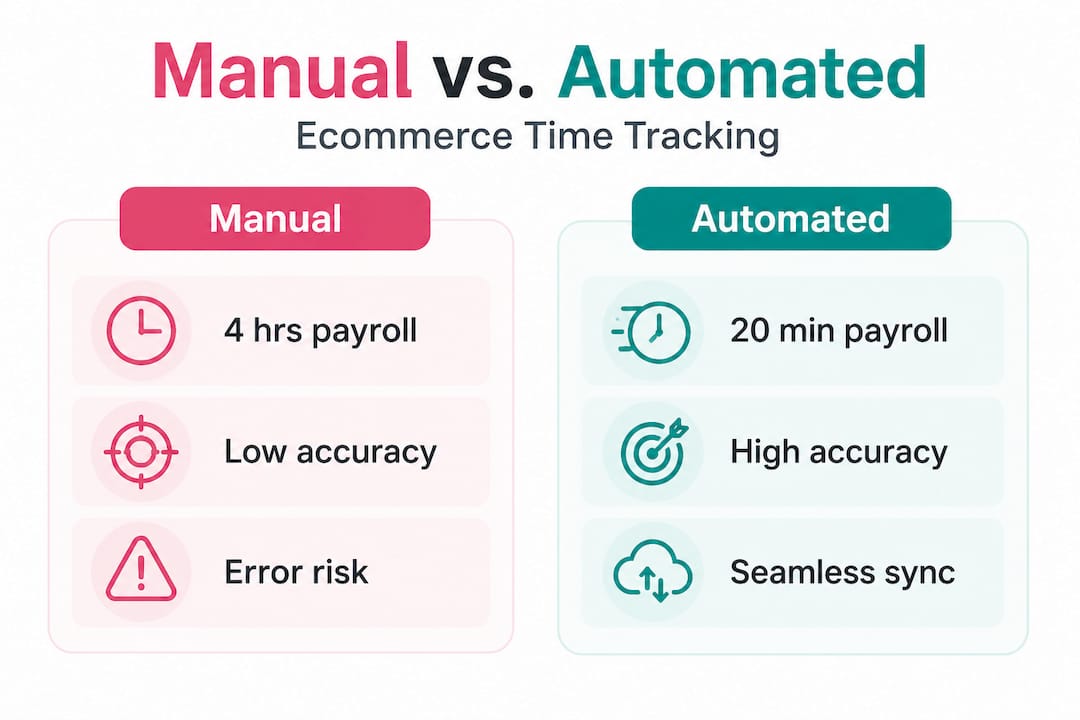
The gains compound quickly. Automated tracking helps small businesses identify inefficiencies and cut down on operational waste, which means you are not just saving time — you are also finding the places where time is being lost without your knowledge.
To leverage time data effectively, follow these steps:
- Monitor consistently. Set up automated tracking across all operational roles and ensure data is being captured without gaps. Inconsistent data is worse than no data because it creates false confidence.
- Analyse by function. Break down time usage by department or task category. Look for areas where hours are disproportionate to output. Customer service taking three times longer than expected on returns? That is a workflow problem, not a staffing problem.
- Adapt your workflows. Use the data to redesign processes. If fulfilment is slower on Mondays because of weekend order backlog, adjust your scheduling. If content creation consistently overruns estimates, refine your briefing process.
- Repeat the cycle. Time tracking data is most powerful when it is used iteratively. Each cycle of monitoring, analysing, and adapting should produce measurable improvements.
Connecting time data to workflow automation tips creates a feedback loop that continuously improves your operations. And when you tie those improvements to AI and automation profitability gains, the financial impact becomes very clear, very fast.
Integrating time tracking with your ecommerce tech stack
Understanding the benefits is one thing. Making time tracking work inside your existing systems is where most businesses either succeed or stall. Integration is the difference between a tool you actually use and one that collects digital dust.
Integrated workflow solutions can further streamline time tracking and scheduling tasks in ecommerce, particularly when your systems share data automatically rather than requiring manual exports and imports.
The most important integration touchpoints for ecommerce businesses are:
- Ecommerce platform (Shopify, WooCommerce, custom stack): Connect time data to order volumes so you can calculate the true cost per order and identify peak demand periods that require more staffing.
- Payroll software: Automate the transfer of approved hours directly into your payroll system. This eliminates manual entry, reduces errors, and ensures your team is paid accurately and on time.
- Project management tools: Link time entries to specific projects or campaigns so you can see exactly what each initiative actually costs in labour hours.
- Customer support platforms: Integrate with your helpdesk to track resolution times and identify where support workflows can be tightened.
- Analytics and reporting dashboards: Feed time data into your business intelligence tools so you can correlate operational hours with revenue, conversion rates, and customer satisfaction scores.
Building these connections requires some upfront planning, but the payoff is a single source of truth for your operational data. Exploring improving business workflows with AI can help you map out which integrations will deliver the most immediate value for your specific setup.
Pro Tip: Choose systems that support API connections. APIs allow your tools to communicate directly and automatically, which means your integrations remain stable as your tech stack evolves. A tool that only offers CSV exports will become a bottleneck the moment your volume grows. Prioritise productivity improvement with AI by building your stack with scalability in mind from day one.
Overcoming common ecommerce time tracking challenges
Even the best system will face resistance if the rollout is handled poorly. Business owners report challenges including team buy-in, system adoption, and data consistency when rolling out new tracking workflows. These are real obstacles, and ignoring them is how good tools fail.
The three most common stumbling blocks are team resistance, accuracy issues, and the challenge of migrating old data into a new system.
Team resistance is almost always rooted in fear. People worry that time tracking means surveillance, that they will be judged for every minute, or that the system will be used against them. Addressing this directly and early is essential. Be transparent about why you are implementing tracking and what you will do with the data. Frame it as a tool for improving processes, not monitoring individuals.
Here is a practical rollout approach that addresses each challenge in sequence:
- Start with a pilot group. Choose a small, willing team to test the system first. Use their feedback to refine the setup before rolling it out to everyone.
- Provide structured onboarding. Do not assume people will figure it out. Run a short training session, create a simple reference guide, and make it easy to ask questions.
- Establish a feedback loop. Create a regular check-in during the first 60 days where team members can flag issues, suggest improvements, and share what is working.
- Celebrate early wins. When the data reveals a genuine improvement, share it with the team. Connecting the tool to a positive outcome builds trust and motivation.
- Migrate old data thoughtfully. Do not try to import years of legacy data all at once. Start fresh with the new system and archive old records separately. Clean data from day one is more valuable than a messy historical import.
"The most successful rollouts we have seen share one thing in common: they treat adoption as an ongoing process, not a one-time event. Ongoing training and feedback loops are what turn a tool into a habit."
Reviewing time tracking best practices before your rollout will help you anticipate resistance and build a plan that accounts for the human side of change. If web management complexity is also slowing your team down, outsourcing web management is another lever worth pulling to free up operational capacity.
Why embracing automation shifts the time tracking game
Here is something most guides will not tell you: the biggest return on automated time tracking is not the hours you save. It is the mental bandwidth you reclaim.
When you are manually reconciling timesheets, you are not just spending time — you are spending attention. And attention is the scarcest resource in any growing ecommerce business. Every hour you spend on administrative reconciliation is an hour you are not spending on supplier relationships, product development, or customer experience improvements that actually compound over time.
Manual time tracking also creates a subtle but damaging management habit: micro-managing inputs instead of outcomes. When you are chasing people for their hours, you are focused on process compliance rather than results. Automation removes that friction entirely. The data arrives without anyone having to chase it. And that shifts your role from administrator to strategist.
We have seen this pattern repeatedly. Operators who automate their time tracking in action do not just become more efficient. They become more experimental. When you have clean, reliable data, you start asking better questions. What would happen if we restructured our fulfilment shift? Can we handle a 40% volume increase without adding headcount? Which marketing campaigns are actually worth the labour hours they consume?
Those are growth questions. And you can only ask them confidently when your operational data is trustworthy. Automation does not just save time — it changes the quality of the decisions you are able to make.
Automate your ecommerce time tracking today
If this guide has shifted how you think about time tracking, the next step is straightforward: stop managing it manually and let purpose-built automation handle it for you.

HumanOS is built exactly for this. Our AI agents automate time tracking, scheduling, and workflow management across your ecommerce operations, with no coding required and no credit card needed to start. The platform integrates directly with your existing tools and delivers measurable results — on average, an 80% boost in productivity and a 30 to 50% improvement in profitability. Explore AI automation for ecommerce and see how it fits your operation, or visit HumanOS for workflow automation to start your free trial today. Your operations deserve better than a spreadsheet.
Frequently asked questions
What are the main benefits of ecommerce time tracking?
Ecommerce time tracking streamlines operations, improves productivity, and provides data-driven insights for better decisions. Automated tracking increases productivity by eliminating manual data entry and surfacing real-time operational patterns.
How do I choose the right time tracking tool for my ecommerce store?
Look for tools with automation, ecommerce platform integration, real-time analytics, and minimal manual entry requirements. Automated systems that provide real-time insights will deliver the most immediate operational value.
Can time tracking be integrated with my payroll and scheduling software?
Yes, most modern solutions integrate directly with payroll and scheduling platforms, reducing admin time and errors significantly. Integrated workflow solutions make it possible to automate the entire cycle from time capture to payroll processing.
How can I help my team adapt to a new time tracking system?
Provide structured onboarding, run feedback sessions during the first 60 days, and connect early wins back to the team. Business owners who succeed with new tracking rollouts treat adoption as an ongoing process rather than a single training event.