

TL;DR:
- Email automation dramatically reduces sending time and error rates, boosting SMB efficiency.
- Proper setup, testing, and strategy are essential to prevent automation pitfalls and maximize ROI.
- AI enhances automation capabilities but requires human oversight to align with business goals.
Email automation is one of the most underutilised tools in the small and mid-sized business (SMB) toolkit, and the efficiency gap it creates is staggering. Research shows that automation cuts execution time from 185 seconds per send down to just 1.23 seconds, a 151x improvement, while simultaneously eliminating a 5% error rate that quietly erodes customer trust. Many operators still assume automation belongs in the enterprise world, reserved for teams with dedicated IT departments and five-figure software budgets. That assumption is costing you time, revenue, and competitive ground. This article breaks down exactly how email automation works, where it delivers the biggest wins for SMBs, and how AI is reshaping the landscape.
Table of Contents
- Defining email automation: What it is and how it works
- The mechanics of automated email workflows
- Common challenges and edge cases in email automation
- Efficiency, productivity, and the impact of AI automation
- Why successful email automation is about smart strategy, not just technology
- Bring automation and AI to your SMB with HumanOS
- Frequently asked questions
Key Takeaways
| Point | Details |
|---|---|
| Massive time savings | Automation reduces manual sending time by 151x for SMB email campaigns. |
| Smart triggers boost engagement | Using targeted triggers helps reach customers at the right moment, improving response rates. |
| Avoid common pitfalls | Address validation, personalisation, and workflow conflicts to maintain brand reputation. |
| AI adds power and risk | AI-driven automation enhances scale but requires careful oversight for quality control. |
| Strategic oversight wins | Successful automation depends as much on good strategy as on technology. |
Defining email automation: What it is and how it works
Most business owners have sent a welcome email manually, typed it out, found the contact, hit send, and then done it again twenty minutes later for the next sign-up. That approach works when you have ten customers. It falls apart fast at a hundred, and it becomes completely unmanageable at a thousand. Email automation solves this at the root.
At its core, email automation is software that automatically sends targeted, personalised emails based on predefined triggers, user behaviours, schedules, or conditions, without manual intervention for each send. The key phrase is "without manual intervention." You set the rules once, and the system executes them consistently, every time, at scale.
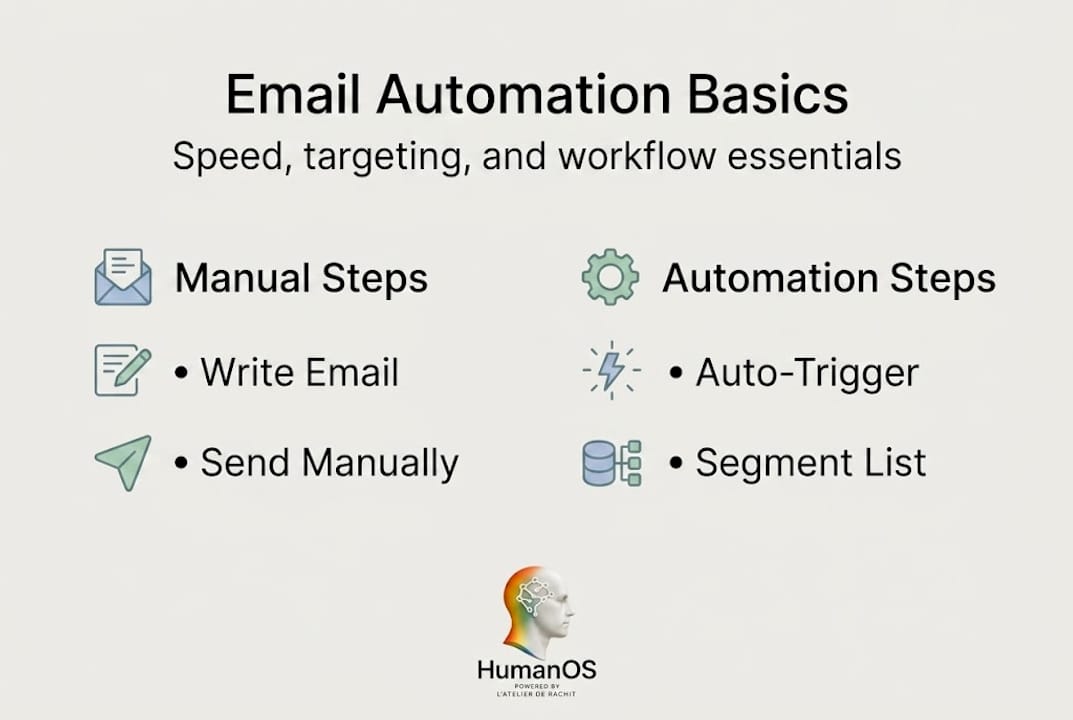
What separates automation from a simple email blast is the intelligence behind it. Core mechanics involve connecting data sources like your CRM, ecommerce platform, or analytics tools, detecting triggers such as sign-ups, cart abandonment, or inactivity, evaluating conditions using segments and if/then logic, personalising content for each recipient, optimising send times, and tracking performance in a continuous loop. Nothing static. Nothing one-size-fits-all.
Think of it like a digital salesperson who never sleeps, never forgets a follow-up, and never sends the wrong message to the wrong segment. That is the practical reality of what well-configured email automation looks like.
Common automation triggers used by SMBs:
- New subscriber sign-up or account creation
- Purchase confirmation or post-sale follow-up
- Cart abandonment after a defined window (often 1 to 4 hours)
- Customer inactivity after 30, 60, or 90 days
- Yearly anniversary or birthday triggers
- Webinar registration or event attendance confirmation
- Form submissions or quote requests on your website
Here is a quick look at how automation changes the operational picture:
| Process step | Manual approach | Automated approach | SMB impact |
|---|---|---|---|
| Contact segmentation | Done by hand in spreadsheets | Auto-tagged by behaviour or data | Saves hours per week |
| Email send | Individual or bulk send | Trigger-based, real-time | Consistent, timely delivery |
| Follow-up sequencing | Tracked manually | Automatically queued | No leads fall through |
| Performance tracking | Periodic manual review | Continuous, live reporting | Faster course correction |
| Personalisation | Copy-paste with edits | Dynamic content fields | More relevant messaging |
"The difference between a business that scales and one that stalls is often not the product or the service. It is whether the infrastructure can keep up with the growth."
Understanding email management efficiency is the first step toward building infrastructure that supports, rather than restricts, your growth ambitions.
The mechanics of automated email workflows
Knowing what automation is and knowing how to build it are two different things. Most SMBs have a vague idea that automation is possible, but they stumble on implementation because no one has walked them through the actual steps.
Here is how a basic automated email workflow comes together:
- Define your goal. Are you onboarding new customers, recovering abandoned carts, reactivating inactive subscribers, or nurturing leads? Each goal needs its own workflow.
- Identify the trigger. A trigger is the specific event that kicks off the sequence. Examples include form submission, purchase completion, or a contact being added to a specific list segment.
- Connect your data source. Your automation platform needs to pull from where your customer data lives, whether that is a CRM, a Shopify store, or a Google Form.
- Build your sequence. Decide how many emails are in the flow, what each one says, and how much time passes between sends. A simple onboarding sequence might be three emails over seven days.
- Apply conditions and segments. Not every contact should receive every email. Use if/then logic to branch the sequence based on behaviour. If someone opens email one but does not click, send a different follow-up than someone who did click.
- Set up tracking. Define what success looks like before you launch. Open rate, click-through rate, conversion rate, and unsubscribe rate all tell a different part of the story.
- Test before activating. Send the entire sequence to a test address, check rendering on mobile and desktop, and verify that every trigger fires as expected.
Core mechanics like CRM integration, trigger detection, segment evaluation, and send time optimisation work together to create a workflow that feels personal to the recipient, even when it is running entirely on autopilot.

The results of a well-structured workflow versus a manual approach are significant:
| Factor | Manual workflow | Automated workflow |
|---|---|---|
| Time per campaign | 30 to 90 minutes | Under 5 minutes (after setup) |
| Consistency | Dependent on staff availability | 100% consistent |
| Personalisation depth | Limited by time | Dynamic, data-driven |
| Scalability | Degrades with volume | Improves with volume |
| Error rate | Up to 5% or more | Near zero with validation |
These workflow automation tips are not just theory. Businesses applying this structure consistently report measurable gains in customer retention and team capacity. The strategic automation ROI that well-run SMBs achieve comes directly from building these systems correctly from the start.
Pro Tip: Before activating any workflow, send the full sequence to at least three different email clients, Gmail, Outlook, and mobile Safari, to catch rendering issues that can make your emails look broken or unprofessional. A broken layout undermines every dollar you invested in the content.
Common challenges and edge cases in email automation
Automation does not fix a broken process. It accelerates it. That is both the promise and the risk. When things go wrong inside an automated workflow, they tend to go wrong repeatedly and at scale before anyone notices.
Edge cases in email automation are more common than most platforms admit. Email address validation alone covers a range of technical traps: plus tags (like name+tag@domain.com) that some systems reject, dot variations in Gmail addresses, internationalised domain names (IDNs), and quoted local-part addresses that are technically valid but frequently cause processing errors. If your validation logic is not accounting for these, you are dropping real contacts.
Beyond validation, SMBs commonly run into these automation pitfalls:
- Over-messaging: A contact who qualifies for three different workflows simultaneously gets bombarded with emails. Without suppression logic, this destroys engagement rates and triggers spam filters.
- Broken personalisation tokens: The infamous {{First_Name}} error, where a fallback is not configured, results in emails that read "Hi , welcome to our community." Not ideal.
- Rigid sequence timing: A five-email sequence built in January may be completely out of context by March if your business has shifted focus, launched new products, or responded to market changes.
- Workflow conflicts: Two automations triggering from the same event can send duplicate or contradictory messages within minutes of each other.
- Rendering failures across clients: Email clients render HTML differently. What looks clean in one client can display as a jumbled wall of code in another. Testing across 40 or more clients is the industry standard for production-level reliability.
Understanding content automation ROI means recognising that the return only materialises when the automation is clean. Errors in the workflow directly translate to lost revenue and damaged sender reputation. A solid business process automation guide will always prioritise error-proofing before scaling.
"Every automation workflow should be stress-tested as if the worst-case scenario will happen at the worst-case moment. Because eventually, it will."
Pro Tip: Build a suppression list into every workflow from day one. Define a maximum email frequency per contact per week (typically two to three is the safe zone), and configure your platform to enforce it across all active sequences. This one rule alone can recover double-digit percentage points in deliverability.
Efficiency, productivity, and the impact of AI automation
The numbers behind email automation are not modest. Automation reduces execution time from 185 seconds per manual send to just 1.23 seconds per automated send, a 151x improvement, while cutting the error rate from 5% down to near zero. For an SMB sending hundreds of emails per week, this translates to dozens of recovered staff hours every single month.
But efficiency is only part of the story. Productivity gains compound when automation frees your team from repetitive execution and lets them focus on work that requires judgement, creativity, and relationship-building. That is where real growth happens.
AI raises the ceiling even higher. AI-powered workflow improvements introduce capabilities like predictive send time optimisation, dynamic content generation, behavioural segmentation that updates in real time, and natural language processing for smarter personalisation at scale.
The business outcomes that consistent automation adoption drives include:
- Higher open and click rates from better segmentation and send time optimisation
- Reduced customer churn through timely re-engagement sequences
- Lower operational costs from reduced manual labour and fewer errors
- Faster lead nurturing cycles that shorten the path from prospect to paying customer
- Improved AI-powered customer support through automated responses and escalation routing
- More consistent automated scheduling and follow-up cadences
Here is a before-and-after comparison that reflects what businesses typically see after implementing structured automation:
| Metric | Before automation | After automation |
|---|---|---|
| Email execution time | 185 seconds per send | 1.23 seconds per send |
| Weekly hours on email tasks | 8 to 15 hours | 1 to 3 hours |
| Error rate | Up to 5% | Near zero |
| Lead follow-up time | Hours to days | Minutes |
| Customer retention rate | Baseline | Typically 10 to 30% improvement |
However, AI is not a magic fix either. Automation at scale introduces real risks: personalisation that crosses into the "uncanny valley" where it feels invasive rather than relevant, burst sending that triggers spam filters, and strategy misalignment that gets amplified rather than corrected by the AI. Human oversight is not optional. It is the thing that keeps automation aligned with your actual business goals rather than just optimising for open rates in isolation.
The most effective SMBs treat AI as a force multiplier for smart strategy, not a replacement for it.
Why successful email automation is about smart strategy, not just technology
Here is something most automation guides will not tell you: technology is the easy part. Platforms are accessible, setup is faster than ever, and the cost barriers have largely disappeared. What actually determines whether automation works for your business is the quality of the thinking behind it.
Automation amplifies both good processes and bad ones. If your email strategy is unclear, your segmentation is vague, or your brand voice is inconsistent, automation will not fix that. It will just deliver those problems to more people, faster, at scale.
The businesses that get genuine ROI from email automation are the ones that treat it as a strategic system, not a technical feature. They define outcomes before they build sequences. They audit their workflows quarterly, not just at launch. They maintain human review of AI-generated content before it goes live. And they measure outcomes (revenue, retention, customer lifetime value) rather than activity metrics (sends, opens, clicks).
Understanding no-code automation benefits can lower the barrier to getting started, but the strategic layer is what determines whether that investment pays off. Start with your business goal. Build the workflow to serve it. Then let the technology execute.
Pro Tip: Schedule a quarterly automation audit. Review every active workflow, check whether the goals it was built for are still relevant, and retire or update anything that no longer aligns with your current strategy. Automation that runs unreviewed for a year can actively work against you.
Bring automation and AI to your SMB with HumanOS
If this article has made one thing clear, it is that effective automation is within reach for any SMB willing to approach it with the right strategy and the right tools.

HumanOS is built precisely for this moment. Our AI agent platform automates email management, scheduling, customer support, document processing, and more, all through a self-guided onboarding system that requires no coding and no credit card to start. On average, businesses see an 80% boost in productivity and 30 to 50% improvement in profitability. Explore our AI agent automation suite to see how we embed intelligent automation directly into your existing workflows, not as another tab to forget, but as the operational backbone your business actually needs.
Frequently asked questions
How does email automation improve operational efficiency for SMBs?
Email automation reduces execution time from 185 seconds to just 1.23 seconds per campaign and cuts errors by 5%, freeing your team from repetitive manual tasks and dramatically improving day-to-day operations.
What triggers can I use for email automation?
Common triggers include user sign-ups, cart abandonment, customer inactivity, purchase confirmations, and event registrations, all configurable through most modern automation platforms without any technical expertise.
What challenges should SMBs expect with email automation?
Validation issues, broken personalisation, workflow conflicts from over-messaging, and rendering inconsistencies across email clients are the most frequent problems, and all of them are preventable with proper setup and regular testing.
How does AI influence email automation for small businesses?
AI scales automation capabilities but also amplifies risks like uncanny personalisation, spam triggering from burst sending, and strategy misalignment; human oversight and regular audits remain essential for protecting brand voice and achieving meaningful business outcomes.